Blog · 01 Nov 2026 · 8 min read
How to rank for "best real estate agency in Noida" on Google
If you run a property agency in Noida, Greater Noida or Greater Noida West, you've probably searched "best real estate agency in Noida" yourself and wondered how the firms at the top got there. Some people will offer to put you on a paid "top 10" list. This guide covers what Google itself says about how local results are chosen, and what an agency can do about it honestly. It's written by the Light & Polish team; we build websites for local businesses, including brokers. Nothing here is a ranking guarantee, because nobody can honestly give one.
What decides who shows up
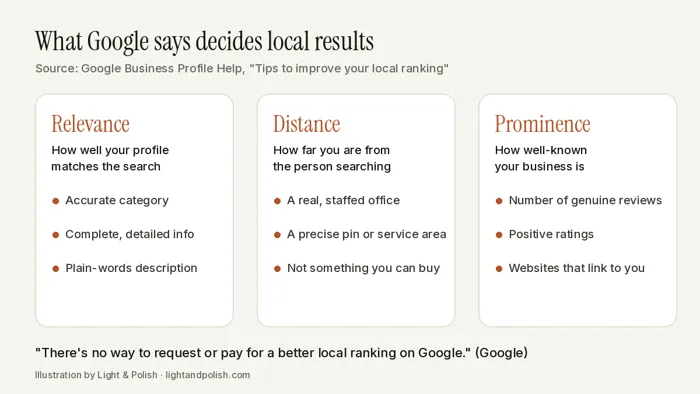
When someone searches for a type of business near them, Google shows local results on Maps and Search. Google's help page on improving your local ranking says these results are mainly based on three things:
- Relevance: how well a Business Profile matches the search. Complete, detailed information helps Google match you to the right searches.
- Distance: how far the business is from the person searching. If the searcher doesn't share their location, Google uses what it knows about it.
- Prominence: how well-known the business is. Google says this is partly based on how many websites link to you and how many reviews you have, and that more reviews and positive ratings can help.
The same page says plainly: "There's no way to request or pay for a better local ranking on Google." So a word like "best" in a search isn't something you can claim or buy. What you can control is how complete and accurate your profile is, how genuinely well-reviewed and well-known your firm is, and whether your website backs it all up.
Do one thing before you change anything: search your main keywords on your own phone, from your office, and note what shows up. Look at which agencies appear in the map results, which portals and directories rank, and what their profiles have that yours doesn't. That's your baseline for the next 30 days.
Step 1: get the Business Profile right
Most of the local work happens in your Google Business Profile. Google's guidelines for representing your business are worth reading in full, because breaking them can get a profile suspended. The parts that matter most for agencies:
- Name: use your real-world business name, exactly as it appears on your board, website and visiting cards. Google says adding unnecessary information, such as taglines, service words or locations, isn't permitted and could result in suspension. "Sharma Properties" is fine; "Sharma Properties Best Real Estate Agent Noida Sector 150" is the kind of name the guidelines rule out.
- Address: list a real office. Google says a virtual office (a rented mailing address you don't operate from) isn't eligible, and an office in a co-working space only counts if it has clear signage, receives customers during business hours and is staffed by your team. If you mostly meet clients at sites and their homes, set it up as a service-area business and hide your address. Google says the overall service area shouldn't usually extend beyond about two hours' drive from your base.
- Category: choose as few categories as it takes to describe the core business, picking ones that complete the sentence "this business IS a". Google says categories shouldn't be used as keywords.
- Description: describe what you actually do: the kinds of property, the areas you cover, whether you're a channel partner for new launches, and how you work. Google doesn't allow links in the description, and it shouldn't focus on prices, offers or sales.
- Agents in the team: Google treats real estate agents as individual practitioners. If several agents work from one office, the firm should have its own profile and each public-facing agent's profile carries only the agent's name. A solo agent working under a brand shares one profile named "Brand: Agent Name".
- Hours, phone and photos: keep hours accurate, use a number your firm controls, and add real photos of your office, team and the work you do. Google lists complete, accurate information and photos among the things that help your profile.
Also make sure you have one profile per location. Google says duplicate profiles cause problems with how your information shows on Maps and Search.
Step 2: reviews, earned the right way
Reviews feed prominence, and they're also what a buyer reads before calling you. Google's rules here are strict, and the most common shortcuts break them. According to Google's policy on fake and misleading content, businesses must not:
- offer payment, discounts or free services in exchange for a review, or for changing or removing a bad one;
- ask only happy clients for reviews, or discourage negative ones;
- pressure clients to review on the spot, or ask them to mention specific words or a particular staff member;
- post reviews from staff, family or anyone with a conflict of interest, or post from several accounts.
What Google does allow, and recommends in its tips to get more reviews, is simple: ask every client to share their real experience, using a review link or QR code from your profile. A natural moment for an agency is a few days after registry or key handover, or after a rental agreement is signed. Ask everyone, not just the smooth deals.
Then reply. Google suggests short, polite, specific replies, never sharing a reviewer's private details, and using negative reviews to explain what you can and can't do. In property, some complaints will be about things outside your control, such as builder delays. A calm reply that says what you did and what you couldn't do reads far better to the next buyer than silence.
Step 3: give Google and buyers something real on your website
Your profile links to your website, and Google says it can detect information about what kind of business you are from your website and from mentions of your business across the web. A broker website that helps here usually has:
- A page for each project you actually deal in, with configuration, sizes, possession timeline and the project's RERA registration number taken from official documents.
- Pages for the areas where you genuinely work, with real local detail: which societies or launches you cover, typical questions from buyers there, and how you help. Be careful here. Google's spam policies describe pages made for different cities or regions that funnel visitors to one page as doorway abuse, and list blocks of city names as keyword stuffing. Ten near-identical "property dealer in Sector X" pages are a risk, not an asset.
- The same name, phone and address (or service area) as your profile, so your firm is described consistently everywhere, as Google's guidelines ask.
- A clear enquiry path: a short form, call and WhatsApp buttons, and quick replies once enquiries come in.
If you'd like a deeper look at what goes on each page, see our page on websites for real estate brokers in Noida. For links, the honest route is being worth mentioning: local news, builder partner pages that list you, associations you belong to. Google's spam policies count buying links, or swapping goods or services for them, as link spam.
Step 4: show your RERA registration
This isn't a ranking factor Google mentions, but it's one of the first things a careful buyer can verify. Under section 9 of the Real Estate (Regulation and Development) Act, 2016, an agent must register with the state RERA authority before facilitating the sale of units in a registered project, and must quote the registration number in every sale facilitated. Putting your agent registration number on your website and in your profile description makes it easy for a buyer to verify you with UP RERA. We're not lawyers, so check the details of your own registration and advertising with your adviser or UP RERA.
A 30-day checklist
- Week 1: note your baseline searches. Fix the profile name, category, address or service area, hours and description so they follow Google's guidelines. Remove any duplicate profiles.
- Week 2: add real office and team photos. Create your review link or QR code and start asking every client from the last few months, with no reward attached.
- Week 3: reply to every existing review, oldest unanswered first. Check your website shows the same name, phone and area as your profile, plus your RERA agent number.
- Week 4: add or improve one project page and one area page with genuinely useful detail. Repeat your baseline searches and note what changed, without expecting overnight results.
None of this is fast, and none of it can be bought. But it builds something a paid list can't: a profile and website that make a buyer feel safe calling you.
Want a second pair of eyes?
We'll do a free audit of your agency's website against this checklist, or build a free private sample homepage so you can see what a cleaner broker site would look like before you spend anything. If you go ahead, our India prices are published: Starter ₹9,999, Booking / Enquiry ₹19,999–24,999, Showroom ₹29,999–39,999, optional care ₹999–1,999 a month, with 50% upfront and 50% at launch (see India prices). For listing photos, we turn edits around within 24 hours and your first sample edit is free; see listing photo edits. Ask for your free audit or sample.
Sources are linked in the text and were checked on 1 November 2026. This guide was drafted with AI assistance and checked line by line by the Light & Polish team against those sources. The diagram is our own illustration. We don't rank or recommend other agencies.
Frequently asked questions
Can I pay Google to show my agency as the best in Noida?
No. Google's own help page says there's no way to request or pay for a better local ranking.
Can I add "Best Real Estate Agency Noida" to my Business Profile name?
Google's guidelines say the name should be your real-world business name as it appears on your signage, website and stationery, and that adding unnecessary information such as taglines, services or locations isn't permitted and could get the profile suspended.
Is it OK to offer a gift card or discount for a Google review?
No. Google prohibits offering incentives such as payment, discounts or free services in exchange for reviews, and it also doesn't allow businesses to ask only happy clients for reviews. Ask every client, with no reward attached.
Should I make a separate page for every sector in Noida?
Only where you have real, specific information to put on it, such as projects you actually deal in and what buyers ask about there. Google's spam policies describe near-identical pages made for different cities or regions that funnel visitors to one page as doorway abuse.
Our services: Real estate agent website noida · Website design greater noida west · Website pricing
Related
This article is general information, not legal advice. Rules change; check the linked official sources.