Blog · 29 Oct 2026 · 5 min read
How to declutter real estate photos: before the shoot and in editing
Clutter is the most common reason a listing photo looks worse than the home really is. Fridge magnets, cables, toiletries, bins, laundry, and a dozen small things on every surface. Buyers scroll past in a second, and a busy photo reads as "small" and "tired". The good news is that most of it can be fixed: ideally at the shoot, and the rest in editing.
Before the shoot: a room-by-room checklist
Ten minutes of tidying saves a lot of editing. Share this with sellers before the photographer arrives.
Kitchen
- Clear the worktops except for one or two styled items, such as a bowl of fruit or a plant.
- Remove fridge magnets, notes and calendars.
- Hide dish racks, sponges, bins, pet bowls and tea towels.
Living areas
- Put away remotes, chargers, games consoles and loose cables.
- Straighten cushions and throws, and fold blankets.
- Remove most family photos and personal items.
- Turn the TV off. A black screen can be replaced in editing if needed.
Bedrooms
- Make beds smoothly, with pillows plumped.
- Clear bedside tables down to a lamp.
- Put away clothes, laundry baskets and anything on the floor.
Bathrooms
- Remove all toiletries, razors and bath toys.
- Put the toilet seat down, and hang matching fresh towels.
- Clean mirrors and glass. Smears show up badly on camera.
Outside
- Move cars off the driveway and put bins out of sight.
- Coil hoses, put away toys, and tidy garden furniture.
- Mow the lawn and sweep paths if there's time.
What an editor can remove digitally

Before
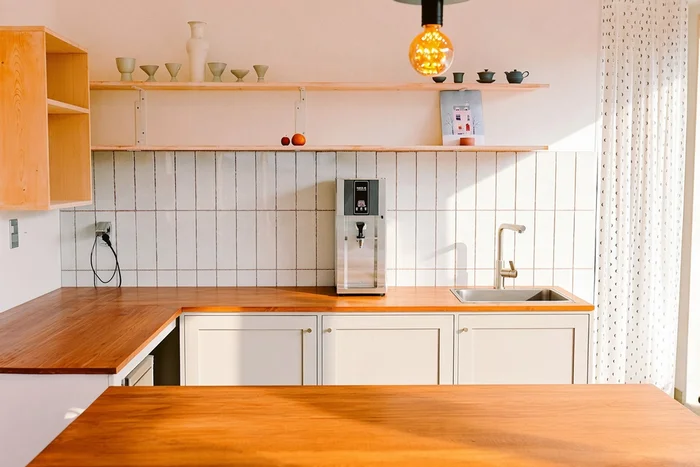
After: our declutter edit
In this demo, the counter clutter is removed while the cabinets, shelves, tiles, window and light fittings stay as they are. Notice that the tiles and worktop continue naturally where items were taken away.
Even with good preparation, some things slip through. A good editor can usually remove:
- Small items on surfaces: bottles, papers, chargers, magnets.
- Cables and power strips.
- Bins, hoses and toys outside.
- Cars parked in front of the house, when they belong to the seller or visitors.
- The photographer's reflection in mirrors or windows.
- Marks, small stains and scuffs on walls that will be cleaned or painted before viewings.
Larger jobs, such as emptying a whole cluttered room, are possible but take more time. If a room is full of furniture, consider virtual staging on an emptied photo instead.
What should never be removed
Decluttering removes things the seller will take away. It must not remove things the buyer will get. Don't digitally remove:
- Damp patches, cracks, water stains or damage.
- Power lines, poles, phone masts or substations.
- Neighbouring buildings, walls or a view of a busy road.
- Fixed fittings that stay with the property, such as a radiator or boiler.
Removing these misrepresents the property. It can breach MLS rules, portal terms and consumer-protection law in the US, UK, Canada and Australia, and it damages trust the moment buyers arrive. See what realtors must disclose about edited photos.
How to brief an editor
- List the photos that need decluttering, by file name.
- Say what to remove ("everything on the kitchen counter except the plant") rather than just "declutter".
- Say what must stay, if there's any doubt.
- Mention any edits that might need disclosure, so they're labelled or skipped.
How we approach a declutter edit
- Read the brief. We use your list of what to remove and what must stay. If something is unclear, such as whether a wall-mounted TV stays with the property, we ask.
- Remove small items first: cables, bottles, papers and magnets. These are quick and make the biggest difference to surfaces.
- Rebuild what's behind them. Worktops, tiles, skirting boards and wood grain have to continue naturally where an item was removed. This is the skilled part, and where cheap edits leave smudges or repeated patterns.
- Handle larger items, such as a laundry basket, a car on the driveway or a pile of boxes, only where the background can be rebuilt accurately.
- Check accuracy. Nothing permanent is removed, and the room's size and layout are unchanged.
- Match the set. Colour and brightness stay consistent with the rest of the listing.
Light declutter vs full room clearing
A light declutter removes the seller's small belongings so surfaces look clean. It's quick, usually included in a standard edit, and rarely raises disclosure questions, because those items leave with the seller.
Full room clearing removes the furniture too, leaving an empty room. That takes longer, can be harder to make convincing, and is usually followed by virtual staging. Because it changes the room's appearance a lot, it's worth labelling the result.
Prep beats editing, but editing saves the day
The best results come from combining both: a quick tidy before the shoot gets rid of most of the clutter, and editing handles what was missed or couldn't be moved, such as a sleeping cat on the sofa or the photographer's tripod leg in a mirror. Share the checklist above with sellers a few days before the shoot, so they have time to act on it.
A note on tenants and occupied homes
When a property is tenanted, you often can't ask the occupants to clear much. Decluttering in editing is especially useful here. Still, be careful with personal items like family photos, mail with names on it and children's names on bedroom walls. Remove or blur them for privacy, even if you leave the furniture.
Want it done for you?
Declutter edits are included in our listing photo editing as needed, along with sky and twilight edits. First listing US$29, then US$45 per listing or US$229 a month, within 24 hours, and you pay after delivery. Send your most cluttered photo for a free edit. Social posts and short AI videos from your listing photos are available too.
Frequently asked questions
What can be removed from real estate photos?
The seller's or tenant's belongings: small items on surfaces, cables, bins, cars, personal photos and clutter. Things that stay with the property, damage, and surroundings such as power lines or neighbouring buildings should not be removed.
Is decluttering in editing as good as tidying before the shoot?
Tidying first gives the best result and is faster. Editing is ideal for whatever was missed or couldn't be moved.
Do I need to disclose a declutter edit?
Removing belongings that leave with the seller is generally treated as acceptable. Clearing whole rooms or adding furniture is a bigger change and is best labelled. Check your MLS or portal rules.
Is decluttering included in your listing price?
Yes, as needed, along with sky and twilight edits: US$29 for your first listing, then US$45 per listing or US$229 a month.
Related
- Real estate listing photo editing
- Day to dusk photo editing: free tools, DIY and paid services compared
- Is virtual staging legal, and is it worth it? A realtor's guide
- How to outsource real estate photo editing (and choose the right editor)
- Real estate photo editing in Australia and the UK: what agents should know
- Real estate photo editing prices: what you should pay per photo or per listing
- Real estate photo editing software vs an editing service: which is right for you?
- Sky replacement in real estate photos: how to do it honestly and well
- Virtual twilight for real estate: when day-to-dusk photos help a listing
- AI listing photos: what realtors must disclose
This article is general information, not legal advice. Rules change; check the linked official sources.