Blog · 29 Oct 2026 · 5 min read
How to outsource real estate photo editing (and choose the right editor)
Editing is the part of listing photography nobody enjoys and everybody needs. Whether you're an agent shooting on a phone or a photographer with three shoots a day, outsourcing the editing can free up hours each week. But choosing the wrong editor means re-dos, delays and photos that don't match your standards. Here's how to do it well.
Step 1: Decide what you actually need
- Basic editing: colour, exposure, straight verticals, window pulls, lens correction.
- Enhancements: sky replacement, lawn touch-ups, fire in fireplaces, TV screens.
- Premium edits: virtual twilight, declutter and object removal, virtual staging.
- Volume: a few listings a month or several a day.
- Turnaround: next morning, same day, or within a couple of days.
Write this down. It becomes your brief and makes quotes comparable.
Step 2: Shortlist two or three editors and test them
Ask each one for a free test edit. Most good services offer one. Send the same photos to each:
- A dark interior with bright windows, to test window pulls and colour.
- An exterior under a grey sky, to test sky replacement and edge masking.
- A cluttered room, to test object removal.
Compare them at full size, not as thumbnails. Look at edges around trees and rooflines, colour casts on white walls, straight verticals, and whether anything that should stay was removed.
Step 3: Check communication and turnaround
- How quickly do they reply to a question?
- Is their stated turnaround in business hours or calendar hours, and in which time zone?
- How do revisions work, and how many are included?
- What happens on public holidays or busy weeks?
An editor in another time zone can be an advantage. Photos sent in the evening can come back by morning.
Step 4: Agree a simple style guide
Consistency is what makes a portfolio or brand look professional. A one-page style guide avoids most re-dos:
- Overall look: bright and airy, or natural and warm.
- Sky preference: soft scattered clouds, or clear blue.
- Whether to replace TV screens, add fire to fireplaces, or green lawns.
- What should never be edited: permanent features, damage, views.
- Output sizes and file naming.
Step 5: Sort out file handoff
Use a shared folder (Dropbox, Google Drive, WeTransfer) or the editor's upload portal. Agree a folder naming system, such as "Address – date – raw" and "Address – date – edited". Make sure you get full-resolution files and, if your MLS or portal needs it, a resized web version.
Step 6: Choose a pricing model
- Per photo: best for photographers who know exactly which images need which edits.
- Per listing: best for agents who want everything handled for one predictable price.
- Monthly: best for steady volume, with one invoice.
Our guide to real estate photo editing prices covers typical ranges and what a fair quote includes.
Red flags
- No free test, or a test that's much better than the paid work that follows.
- Willingness to remove permanent features or damage without question.
- No written turnaround or revision policy.
- Payment upfront only, with no trial.
- Portfolios full of images you can find elsewhere online.
Keep yourself on the right side of the rules
You remain responsible for the photos you publish, even if someone else edited them. Make sure your editor understands MLS and portal rules, and label edits that need disclosure. See what realtors must disclose about edited photos.
A sample brief you can copy
Send something like this with your first order, and you'll avoid most back-and-forth:
- Property: 14 Elm Road, 3-bed house, 26 photos (6 exterior, 20 interior).
- Look: bright and natural, not oversaturated. White walls should stay neutral white.
- Sky: replace on all exteriors with the same soft, partly cloudy sky.
- Twilight: front exterior only (photo 01).
- Declutter: kitchen counters (photos 08 and 09), keep the fruit bowl. Remove the bins by the side gate (photo 05).
- Do not remove: the telegraph pole across the road, or the neighbour's extension.
- Output: full resolution plus 2048px long-edge copies, file names unchanged.
- Deadline: by 9am tomorrow, London time.
Before and after: what to look for in a test
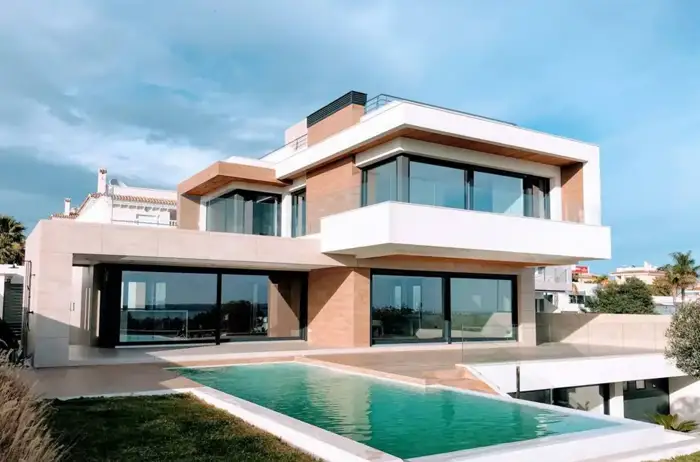
Before
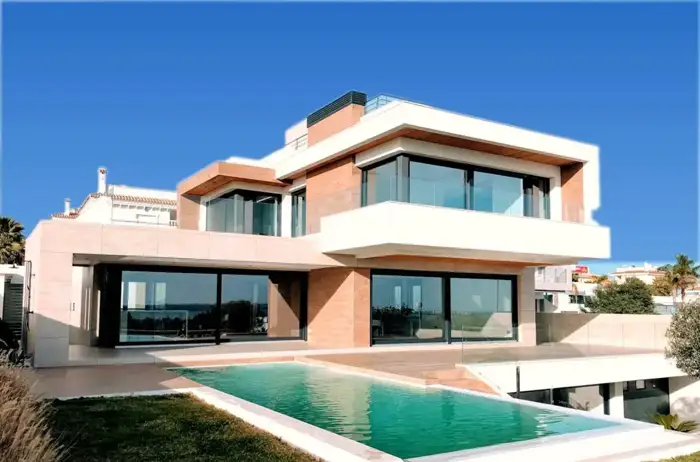
After: our sky replacement edit
When you compare test edits, view them side by side like this at full size. Check the roofline and tree edges, the colour of white surfaces, how natural the light on the building looks, and whether the edit stays true to the property.
For photographers: keeping your brand when you outsource
If you're a real estate photographer, the editor's work goes out under your name. A few habits protect your reputation:
- Create a reference set of five to ten of your own finished photos that show your house style, and send it with every new editor.
- Use consistent shooting habits, such as the same bracket spacing and white balance, so results are predictable.
- Spot-check every job before delivery to your client, at least the lead images.
- Keep a short list of "never" edits for compliance, and share it with the editor.
- Build a second editor relationship for busy periods, tested on the same reference set.
Scaling up
Start with one or two listings a week until the style and turnaround are reliable, then increase. Keep the brief template and reference set updated as your style evolves, and review a random sample each month rather than assuming quality stays the same.
Try us
We edit listing photos for agents in the US, UK, Canada and Australia, priced per listing: US$29 for your first listing, then US$45 per listing or US$229 a month. Sky, twilight and declutter edits are included as needed, delivery is within 24 hours, and you pay after delivery. Start with one free test photo. We also make social posts and short AI videos from listing photos.
Frequently asked questions
Is it safe to send listing photos to an overseas editor?
Generally yes, using a shared folder or the editor's portal. Avoid sending photos that show personal documents or identifiable people, and agree that files are only used for your job.
How do I keep a consistent style with an outsourced editor?
Send a short style guide and a reference set of your finished photos, use the same brief template each time, and give quick feedback on the first few jobs.
What turnaround should I expect?
Many services offer next-day or 24-hour delivery. Check whether that's calendar or business hours, and which time zone.
Can I test Light & Polish first?
Yes. Send one photo for a free edit. After that it's US$29 for your first listing, then US$45 per listing or US$229 a month, delivered within 24 hours, and you pay after delivery.
Related
- Real estate listing photo editing
- Day to dusk photo editing: free tools, DIY and paid services compared
- How to declutter real estate photos: before the shoot and in editing
- Is virtual staging legal, and is it worth it? A realtor's guide
- Real estate photo editing in Australia and the UK: what agents should know
- Real estate photo editing prices: what you should pay per photo or per listing
- Real estate photo editing software vs an editing service: which is right for you?
- Sky replacement in real estate photos: how to do it honestly and well
- Virtual twilight for real estate: when day-to-dusk photos help a listing
- AI listing photos: what realtors must disclose
This article is general information, not legal advice. Rules change; check the linked official sources.