Blog · 03 Nov 2026 · 18 min read
Google Business Profile for real estate agents in Noida: a setup and posting checklist
If you run a property agency or work as a channel partner in Noida, Greater Noida or Greater Noida West, your Google Business Profile is what shows on Google Search and Maps when a buyer looks up your firm. This is a hands-on checklist for setting one up properly and keeping it healthy: which kind of profile you're allowed, how verification works (including Google's video option), what to put in each field, what Google says about photos and posts, what has happened to Q&A, and what gets profiles suspended. It's written by the Light & Polish team. We build websites for local businesses, including brokers. Every rule below links to Google's own help pages, which we read on 3 November 2026, and where something is our suggestion rather than Google's rule, we say so.
If you want to know how Google decides who appears in local results, and how to ask for reviews without breaking its rules, we covered that in how to rank for "best real estate agency in Noida". We won't repeat it here.
Step 0: check you're eligible, and which type of profile you are
Google's eligibility guidelines say a business must make in-person contact with customers during its stated hours. Three points on that page matter for property firms:
- A flat or project can't have its own profile. Google lists "rental or for-sale properties such as vacation homes, model homes, or vacant apartments" as ineligible. Sales or leasing offices, however, are eligible. So the profile is for your firm, not for each tower you sell.
- Lead generation agents or companies aren't eligible. Google's guidelines for representing your business add that sales associates or lead generation agents for corporations aren't individual practitioners. If you meet buyers, show sites and close deals yourself, you're a business serving customers; if you only collect enquiries to pass on, Google's wording suggests you don't qualify.
- A virtual office isn't eligible. The same guidelines say a rented mailing address you don't operate from can't have a profile, and a co-working office only counts if it has clear signage, receives customers during business hours and is staffed by your team.
Then decide which of Google's three set-ups fits how you actually work. Google's service-area help page defines them:
| How you work | Profile type | What Google says |
|---|---|---|
| Buyers visit your office, which has your name on a permanent sign and is staffed in your hours | Storefront | Show the address. Businesses showing their address should keep permanent fixed signage of the business name there. |
| Buyers visit your office, and you also go to sites and clients' homes | Hybrid | Show the address, set hours for when staff are available, and add a service area. |
| You work from home or on the move, and clients don't come to your address | Service-area business | Remove the address and list only service areas. One profile for the whole area you serve. |
Google says you can set up to 20 service areas by city, postal code or other area, not as a radius, and the overall area shouldn't usually be more than about two hours' drive from where you're based. If your office has no permanent signage, Google says it's not eligible as a storefront and should be listed as a service-area business.
Google treats real estate agents as individual practitioners, with separate rules for firms with several agents and for solo agents under a brand; we summarised those in our Google ranking guide. Support staff shouldn't create their own profiles.
Step 1: create or claim the profile
First search Google Maps for your firm's name. If an unverified profile already exists, Google's add or claim help page says you can select Claim this business and then Manage now. If nothing exists, go to business.google.com/add and follow the on-screen steps. Google says adding or claiming a profile costs nothing. If someone else has already verified your business, you request ownership rather than making a second profile; Google says there should only be one profile per business.
Use a Google Account the firm controls, not a staff member's personal one. That's our suggestion, but it follows from Google's ownership rules: only owners or authorised representatives may manage a profile, an outside helper (Google's examples include an SEO company or a friend of the owner) must never claim it without the owner's express consent, and must transfer ownership to the owner immediately on request. If someone manages your profile for you, add them as a manager rather than handing over the owner login.
As you go through the set-up screens, fill in:
- Name: exactly as it appears on your board, website and visiting cards, with no taglines, service words, locations or phone numbers added. Google says unnecessary information in the name could result in suspension.
- Category: see Step 3.
- Location or service area: as decided in Step 0. Suite, floor and tower numbers can go in the address; keywords and links can't.
- Phone: a number under the firm's direct control. Google's edit help page says you can add up to two more numbers, and that in India it double-checks phone numbers to make sure they're correct.
- Website: your own site's full URL. Google's guidelines don't allow numbers or URLs that redirect people to landing pages other than the actual business's.
- Hours: your real customer-facing hours, with special hours for festivals and holidays.
Step 2: verification, including video
Google's edit help page says a business must be verified to show on Search, Maps and other Google services, and its photos page says photos only show after verification. Google's verification help page says the methods are chosen automatically by Google based on your business type, public information, region and hours, and can't be changed. You may see one or more of these:
- Phone or text: you need to be able to answer the business number or receive texts; an IVR system won't receive the code.
- Email.
- Live video call: only within your business hours, while you're at the business and can show the location and that you manage it.
- Postcard: Google says most codes arrive within 14 days and expire after 30 days. While you wait, don't edit your name, address or category, or the code won't work, and don't request a new code, which cancels the one in the post.
- Video recording: Google recommends this one if it's offered to you.
Google's video verification page sets out what the recording needs. It must be recorded live and uploaded from your phone through your Business Profile (not pre-recorded), be at least 30 seconds long, and be one unedited, complete take with no breaks. It must not show bank, tax or ID numbers, private information or other people's faces. What it has to show depends on your profile type:
- Storefront or hybrid office: your location (street signs, building numbers, nearby businesses), proof the business exists (your name on a permanent sign, wall or window, matching the profile name exactly) and proof you manage it (things only staff can access).
- Service-area business: where you operate (street signs or landmarks near your base; Google says a home-based business can film its neighbourhood), proof the business exists (Google's examples include your workspace, business cards and branded clothing) and proof of management (for example a business document such as a permit, invoice or utility bill in the profile's name).
For a Noida office, a plan that covers those points might be (our suggestion): start at the nearest sector or road sign, walk to your building and show its number or name, pan to your signboard, unlock the office door, and show a business document with the name visible but any account, tax or ID numbers covered. Plan it before you press record, because you can't stop and edit.
Google says video reviews take up to 5 business days. If the video is rejected, a Review issues notice explains why and you can record a new one.
Our advice: be wary of anyone who offers "guaranteed verification" or asks for your code. Google's verification page says it will never ask for your code and that you shouldn't share it with anyone, even people who manage your profile.
Step 3: choose categories carefully
Google's guidelines ask you to pick as few categories as it takes to describe your core business, choose ones that complete the sentence "this business IS a", and not use categories as keywords. The category help page says you can't create your own category, and that the categories you pick affect local ranking. Google's edit page says you can add up to 9 more categories after the primary one.
When we searched Google Maps for agencies in Sector 18, Noida on 3 November 2026, profiles showed labels including "Real estate agency", "Real estate agent" and "Real estate consultant". In our view, a firm's profile should usually use the agency category as primary and an individual practitioner's profile the agent category, adding others only if they really describe the business. Pick from the list Google shows you; don't type in keyword phrases.
One warning: Google's category page says that if you add or edit a category, you might be asked to verify your business again. Get categories right at the start rather than experimenting later.
Step 4: write the description (and where your RERA number fits)
Google's edit page says the description can be up to 750 characters, mustn't include URLs or HTML, and should focus on your business rather than promotions, prices or sales. Its guidelines add that the description shouldn't have links of any kind or gimmicky characters. Good things to include, per Google: what you offer, what makes you different, how long you've been in business, and anything else customers need to know.
For an agency, that usually means the kinds of property you handle (new launches, resale, rentals, commercial), the sectors or areas where you genuinely work, how you work with buyers, and your registration. Section 9(5) of the Real Estate (Regulation and Development) Act, 2016 says a registered agent is given a registration number that must be quoted in every sale they facilitate. Putting your agent registration number in the description isn't a Google requirement, but in our view it's an easy way to let a buyer check you on the UP RERA website. We're not lawyers, so check the details of your own registration with your adviser or UP RERA.
A made-up example, about 510 characters:
Sample Realty is a property agency in Sector 62, Noida, helping families buy, sell and rent flats in Noida and Greater Noida West since 2018. We handle resale and rental flats and act as a channel partner for selected new launches, and we tell you which role we're playing on each deal. Our team shows you sites in person, explains the paperwork, and stays with you until registry or handover. Office visits by appointment or during our listed hours. UP RERA agent registration: [your registration number].
Notice what's missing: no prices, no "best agent in Noida", no link and no phone number in the text.
Step 5: photos that follow Google's rules
Google's photo guidelines give the technical specs: JPG or PNG, between 10 KB and 5 MB, recommended 720 × 720 px and at least 250 × 250 px. The photo should be in focus and well lit, with no significant alterations or excessive use of filters or AI; in Google's words, it should "represent reality". Its photos and videos page says videos can be up to 30 seconds and 75 MB at 720p or higher, that media shows only after the profile is verified, and that it can take 24 to 48 hours to appear.
Google's tips for posting media to Maps, which its posts policy links to, go further: use media you captured at the location, and avoid screenshots, stock photos, collages, heavily edited or manipulated photos, and imagery created by other parties. For an agency, our reading is that builder renders and brochure images belong on your project pages and in your messages, not in your profile's photos.
Google's photo tips suggest at least three photos in each relevant group. For an agency, we'd start with:
- Exterior: your building and signboard, from each direction a visitor arrives, ideally at different times of day.
- Interior: the reception and meeting area as a client sees it.
- Team: the people a buyer will actually meet.
- At work: site visits and client meetings, with permission from anyone shown.
Phone photos are fine if they're sharp and bright. Basic corrections such as straightening and lighting are in line with Google's tips; adding things that aren't there isn't. If your listing photos need that kind of honest clean-up, see our listing photo edits.
Step 6: posts, and a cadence you can keep
Google's posts help page describes three post types:
- Update: text, photo or video, with an optional button linking to your site.
- Offer: needs a title, dates and times, and adds a "View offer" button; can include terms.
- Event: needs a title and start and end dates, such as an open day at your office.
To post, go to your profile and select Posts, then Add post. You can schedule posts and set them to repeat. Google reviews each post (statuses are Live, Pending or Not approved), and posts older than six months are archived unless a date range is set. Two rules to know: Google says posts with a phone number in the text might be rejected if it can't verify the number belongs to the business, and its posts content policy suggests adding a Call now button instead. Google also lists financial services among regulated industries where you can post but shouldn't include content about the products, so in our view loan offers are best left out of posts.
If a post is about a specific project, remember the RERA side. Section 11(2) of the RERA Act requires a promoter's advertisements to mention the Authority's website address and the project's registration number. That section is written for promoters; whether and how it applies to your own creatives is a question for your adviser, but in our view including the project's registration number on any post about a registered project is the safe habit. We'll cover advertising rules in a separate guide.
Our suggested cadence, which is our view and not a Google rule: one post a week that you can sustain, rather than a burst of ten and then silence. Useful ideas for an agency:
- a new resale or rental listing in a society you cover, with a real photo, linking to the page on your website;
- an explainer on a buyer question you heard this week, such as what a possession letter is, linking to a longer post on your site;
- an Event post for an office open day or a document-check camp;
- a change to your hours for a festival, posted alongside special hours on the profile.
Every post should send people somewhere useful. That's where a proper project or area page on your own site earns its keep; see websites for real estate brokers in Noida.
Step 7: Q&A in 2026, accurately
If you've read advice about filling your Q&A section with your own questions, check it against Google's current pages. On 3 December 2025 a Google employee announced changes to the Q&A feature: customers can ask their question directly in Google Maps and get an instant answer based on your answers and relevant reviews, and businesses can answer "aggregated questions" instead. The same announcement says you can continue to answer existing questions in the Q&A section of your Business Profile, and that published questions and answers may still be shown in Maps.
Google's edit help page, checked today, still has a Q&A section but says the feature is available only for select business categories and regions and that its appearance and functionality might change. We haven't checked every profile, so we can't tell you whether yours has it. What to do:
- Open your profile and look for the Q&A section. If it's there, answer any existing questions accurately and briefly.
- Don't plan around posting your own questions and answers; Google's current pages don't describe that option.
- Keep any answers you've published accurate and up to date, because the announcement says Maps answers are based on your answers and relevant reviews.
- Put your real FAQs (documents needed, brokerage terms, which areas you cover) on your own website, where you control them. That last point is our view.
Step 8: reviews, in one paragraph
Ask every client, never offer anything in return, and reply to reviews politely without sharing private details. Google's policy on fake and misleading content sets out the rules, and our Google ranking guide covers how to ask and reply in detail.
Keeping it healthy: edits that can trigger re-verification
A verified profile isn't finished. Google reviews your changes before they go live, and some changes put you back into verification:
- Name: Google's edit page says that if you change your business name after verification, you might need to verify again. Its policy overview says Google may reject significant name or category changes, and that if the business has changed significantly the old profile should be marked permanently closed rather than renamed.
- Category: adding or editing one might trigger verification again (Step 3).
- Address: if you move to a new address after verification, Google says you must verify again.
- Recent edits generally: Google's verification page says that if you're asked to re-verify, it's likely because some details were recently updated.
Two more things to watch. Google's edit page says that in select regions it may call, text or WhatsApp your verified number to confirm details, and that answers can update your profile; you can review this under Edit profile and then Collected info. And Google's policy overview says owners who don't access their profile for long periods may have their access revoked after a warning.
Our suggested monthly routine: sign in, check every field still matches your board and website, look at Collected info, update special hours for coming festivals, and make one change at a time so you know what caused any re-verification request.
Suspension risks, and how reinstatement works
Google's guidelines and policy pages describe problems that can get a profile suspended or disabled. For property firms, the ones to check are:
- keyword-stuffed names, such as adding "Best Property Dealer Noida" to your firm's name;
- a virtual office, or a co-working desk without signage, staff and customers during business hours;
- a P.O. box address, which Google's policy overview says leads to suspension;
- more than one profile for the same location, including a second profile made after a suspension;
- profiles for projects or flats, or a profile for what is really a lead generation operation;
- an account-level problem: Google says if your account is restricted for a pattern of violations, all the profiles it manages are suspended.
If it happens, Google's suspended profile help page sets out the route:
- Fix whatever breaks the guidelines first.
- Open the Business Profile appeals tool while signed in to the account that owns the profile, choose the profile and the decision, and read the reason and policy link it shows.
- Attach evidence whose name and address match the profile. Google's examples are official business registration, a business licence, tax certificates and utility bills (electricity, phone, water or internet).
- Submit once. Google says appeals can only be submitted once, and its appeals page says decisions can take up to 5 business days and not to send multiple appeals for the same issue.
- Don't create a new profile for the same business while you wait. If the appeal is denied, Google says it may allow an additional review with new evidence.
If your account itself is restricted, Google says you appeal the account restriction first, then the profile suspension.
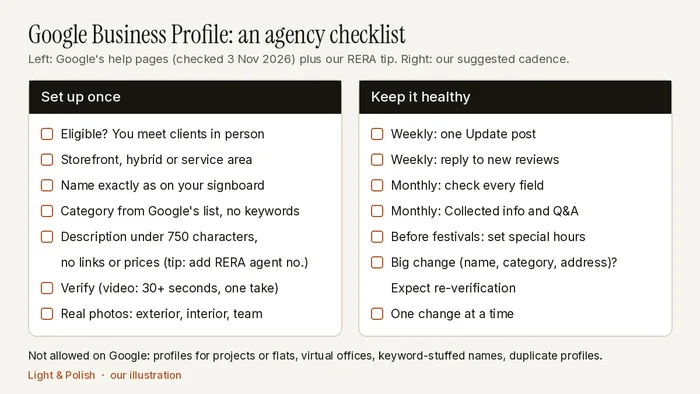
The checklist
Set up once
- Confirm you're eligible: you meet clients in person, you're not a virtual office, and the profile is for the firm, not a project.
- Choose storefront, hybrid or service-area, and set up to 20 service areas if relevant.
- Name exactly as on your signboard; no keywords.
- Primary category from Google's list; extra categories only if they're true.
- Description under 750 characters, no links or prices; our tip is to include your RERA agent registration number.
- Phone the firm controls, your own website, real hours.
- Verify with the method Google offers; plan the video before recording.
- At least three real photos each of exterior, interior and team; no stock images or renders.
Keep it healthy (our suggested cadence)
- Weekly: one Update post linking to a useful page on your site; reply to new reviews.
- Monthly: check every field, Collected info, Q&A if you have it, and festival hours.
- Before any big change (name, category, address): expect re-verification, and change one thing at a time.
Want a second pair of eyes?
We'll do a free audit of your agency's website and how it links up with your Business Profile, or build a free private sample homepage so you can see what a cleaner broker site would look like before you spend anything. If you go ahead, our India prices are published: Starter ₹9,999, Booking / Enquiry ₹19,999–24,999, Showroom ₹29,999–39,999, optional care ₹999–1,999 a month, with 50% upfront and 50% at launch (see India prices). For listing photos, we turn edits around within 24 hours, you pay after delivery, and your first sample edit is free; see listing photo edits. For where your enquiries come from beyond Google, see our guide to real estate lead generation in Noida. Ask for your free audit or sample.
Sources are linked in the text and were checked on 3 November 2026; Google says some Business Profile features may change, so check the linked pages before acting. This guide was drafted with AI assistance and checked line by line by the Light & Polish team against those sources. The checklist graphic is our own illustration and the example description is made up. We're not lawyers, and we don't rank or recommend agencies.
Frequently asked questions
Can a broker or channel partner get a Google Business Profile?
Yes, if you meet customers in person during your stated hours, either at a real office or by visiting them as a service-area business. Google lists lead generation agents or companies as ineligible, and says a virtual office (a rented address you don't operate from) can't have a profile.
Can I make a separate Business Profile for each project I sell?
No. Google's eligibility guidelines list rental or for-sale properties, such as model homes or vacant apartments, as ineligible. Sales or leasing offices are eligible. Make one profile for your firm and link to project pages on your website.
What does Google's video verification need?
A live recording from your phone, made through your Business Profile, at least 30 seconds long and in one unedited take. It must show where the business is, proof it exists (such as your name on a permanent sign) and proof you manage it, without bank, tax or ID numbers or other people's faces. Google says review takes up to 5 business days.
Does Google Business Profile still have Q&A?
Partly. In December 2025 Google announced that customers would ask questions directly in Google Maps and get instant answers based on business answers and reviews. Google's help page says the Q&A section is now available only for select categories and regions, and owners can still answer existing questions there.
My profile was suspended. Should I make a new one?
No. Google says not to create a new Business Profile for the same business. Fix the issue, then use the Business Profile appeals tool once, with documents whose name and address match the profile.
Our services: Real estate agent website noida · Website design greater noida west · Website pricing
Related
- Real estate lead generation in Noida: what actually works in 2026
- How to rank for "best real estate agency in Noida" on Google
This article is general information, not legal advice. Rules change; check the linked official sources.