Blog · 05 Nov 2026 · 10 min read
How to shoot a Dubai listing for Bayut and Property Finder
If you list apartments, villas or off-plan units in Dubai, the photos you upload to Bayut, Property Finder and Dubizzle are what buyers see first. This guide is for Dubai and UAE agents and brokers (and the photographers you brief). It covers portal photo specs we could verify from official help pages and Property Finder's published quality checklist, how to shoot apartments, villas and off-plan honestly, which edits stay fair, and the Dubai Land Department / RERA advertising-permit context. We're the Light & Polish team — we edit listing photos for agents, including in Dubai. We are not lawyers. Rules change; check the live portal help and DLD/RERA pages, and ask your brokerage's compliance lead before you publish.
For the edit types we offer (virtual twilight, sky replacement, declutter, staging, exposure and verticals), see our Dubai real estate photo editing page and the main listing photos page. This post is the shoot-and-upload brief, not a sales page.
Property Finder: photo rules that feed the Quality Score
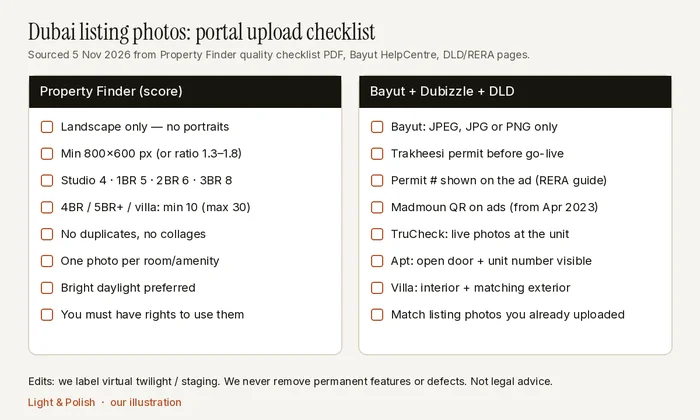
Property Finder scores listings on several criteria, including images. We could not load its Help Centre article live on 5 November 2026 (Cloudflare challenge), so we used two published sources: the indexed text of What is Listing Quality Score? and Property Finder's downloadable PDF How to get top quality score — checklist (from the Property Finder hub downloads bucket). Cross-check both against your PF Expert screen before you upload.
From those sources, the image rules that matter for a shoot brief are:
- Count by bedrooms (residential): studio minimum 4; 1 bedroom 5; 2 bedrooms 6; 3 bedrooms 8; 4 bedrooms 10; 5+ bedrooms 10. Maximum 30. The checklist also lists villa at minimum 10 / maximum 30, and separate commercial minima (for example office space 5, showroom 5, compound 10).
- Size and ratio: minimum resolution 800 × 600 pixels, or an aspect ratio between 1.3 and 1.8. The help text tip is to set the phone or camera to 4:3.
- Orientation: the checklist says all images should be landscape — no portrait photos.
- Uniqueness: several angles of the same room are fine; uploading the same image twice is not. Collages are not allowed; each image should show a single part of the property.
- Diversity: include at least one photo for each room or amenity. A 1-bedroom example in the help text needs bedroom, bathroom and kitchen covered; bathrooms, kitchens, living areas and bedrooms should appear.
- Look: brightly lit, high-resolution, clear (not pixelated). The checklist prefers daylight with a professional camera. You must have the rights to use the images. The checklist includes a line that images are subtly watermarked; Property Finder also documents watermark tools in its partner materials.
- More is not better for the score: the checklist says once you hit the minimum, extra images do not improve the Quality Score — focus on quality.
In our view, that means brief the photographer for a complete room set in landscape, daylight where possible, and a hero exterior that still looks like the same building on site. Do not pad the gallery with duplicates or collage boards.
Bayut (and Dubizzle): formats, TruCheck and live photos
Bayut's Help Centre is clear on formats: to upload images, use JPEG, JPG or PNG — other formats are not accepted (Why can't I upload images to my listing?, March 2024).
Bayut also runs TruCheck™, which ties a listing to live photos taken at the property through Profolio. The Agent Portal TruCheck guide (read 5 November 2026) says you first submit the unit's Trakheesi permit number for the Checked badge (permit details such as purpose, bedrooms and location must match the listing). Then, at the property, you take up to five live photographs in the Profolio app. The Help Centre's TruCheck picture guidelines (April 2024) say, in short:
- Apartments / hotel apartments: at least one clear picture from outside with the main door open, showing the unit number and a partial view of the interior; supporting pictures from inside that match the listing images on Bayut.
- Villas / townhouses: at least one clear interior picture; supporting exterior and interior that align with the listing images.
- Showrooms and shops: taken from inside; recommended to match listing images.
- Commercial / residential buildings: at least one clear building exterior; supporting exterior and interior.
- Business centres / offices: office space number with the door open, showing the inside.
- Location: images should be captured and uploaded directly from the property so location coordinates are accurate.
The Agent Portal guide adds the practical tip for apartments: photo outside the front door with the door slightly open and the unit number visible; for villas, enter (preferably the living room) and take a photo similar to the listing set. Bayut says uploading up to five relevant photos improves the chance of approval. Plan your marketing shoot so the gallery you publish can also support a TruCheck pass — same unit, same rooms, recognisable angles.
Bayut's Agent Portal Trakheesi guide also states that a marketing permit is mandatory to publish property advertisements in Dubai, that the Trakheesi permit number is required for a listing to go live on Bayut and dubizzle, and that for newspaper ads the permit number must be mentioned (among other newspaper-specific rules). Treat Dubizzle the same way for permit go-live when you use the shared Profolio flow Bayut describes.
Trakheesi, Madmoun and what every Dubai ad has to carry
Dubai Land Department's Real Estate Ad Permit service covers newspaper, SMS, outdoor, vehicle, printed, electronic, billboard, promotional campaigns, open house, classified, exhibitions, project launches, promotion platforms and seminars. Brokers must upload a marketing contract with the property owner for those permit types listed on the service page. Fees on that page include AED 1,000 for most permits (AED 5,000 for a project launch event permit) plus AED 20 Knowledge and Innovation Fee — confirm current fees on DLD before you pay.
RERA's Real Estate Brokerage Practice Guide 2024 says brokerages must obtain a permit for any real estate advertisement or marketing material through Trakheesi, and that the permit number must be displayed on the ad.
Separately, DLD/RERA's Madmoun service issues a QR code for each advertisement permit through Trakheesi. DLD's announcement of 18 April 2023 said that from 24 April 2023 real estate companies were expected to feature the QR code on print and audiovisual advertisements so customers can verify RERA approval and see company and property details (Madmoun news; circular listing Applying the QR code system for real estate ads, 11 April 2023). DLD repeated the display requirement in its 24 April 2025 update on the AI-enabled advertising governance platform, which monitors ads on Property Finder, Dubizzle and Bayut (DLD news).
What this means for photos, in our view: the gallery must be of the unit named in the permit. Stock photos of a different tower, another unit's view, or a developer's generic amenity set presented as "this listing" are the kind of mismatch portals and DLD monitoring are built to catch. We're not lawyers; your brokerage decides how permit numbers and Madmoun QR codes appear on each channel.
How to shoot apartments, villas and off-plan
These shooting tips are our view as editors, not portal rules. They sit on top of the specs above.
- Daylight first. Property Finder's checklist prefers bright daylight. Soft morning or late-afternoon light in Dubai still keeps window views readable; harsh midday often blows out Marina or Downtown glass. Shoot interiors with lights on only if they help colour balance — we can even exposure later, but we cannot invent a view that was never there.
- Verticals straight in camera when you can. Keep the camera level so walls don't lean. We correct converging verticals in post (see exposure and verticals), but a level take is cleaner for portals that crop aggressively on mobile.
- Landscape frames. Match Property Finder's landscape preference. Leave a little edge room so a portal crop doesn't cut a balcony rail or unit number you need for TruCheck.
- One clear shot per room, then a second angle if it adds information. Cover bedroom, bathroom, kitchen and living for apartments; add majlis, maid's, storage, balcony, pool and garden for villas so you hit Property Finder's diversity rule without duplicates.
- Honest angles. Don't crop out a neighbouring tower, a construction site next door, or a blocked view if that is what a buyer will see. If you photograph a view, caption it from which room. Off-plan units: use the actual unit or a clearly labelled show flat / CGI — never mix an upgraded show unit with "your apartment" without saying so.
- Off-plan extras. Bayut's Trakheesi Agent Portal guide notes extra fields for off-plan (project number, value, status) and says newspaper ads for off-plan must mention developer, escrow account number, expected completion and proposed service fees. Your photos should not contradict those disclosures (for example, do not imply a finished lobby that is still a CGI).
Which edits stay fair (and what we refuse)
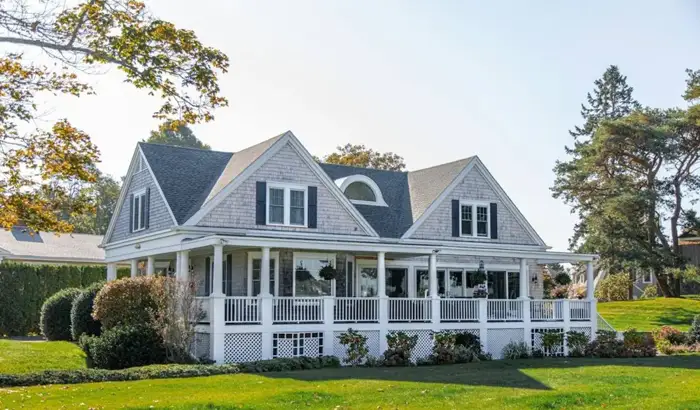
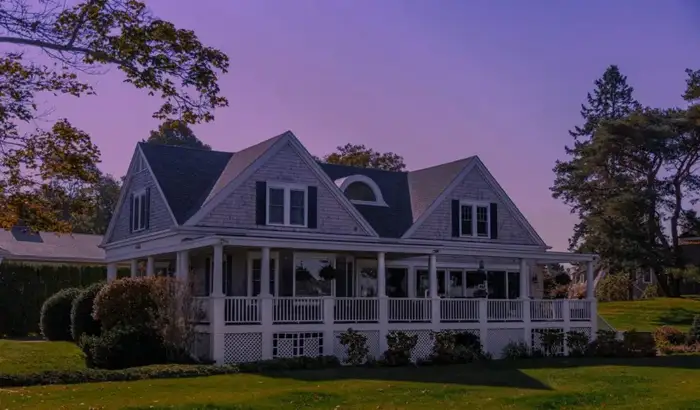
Neither Bayut nor Property Finder published a named rule on virtual staging, sky replacement or virtual twilight that we could find on 5 November 2026. DLD's published focus is permits, Madmoun verification and monitoring ads for compliance — not a pixel-level edit manual. So the safe test, in our view, is: would a buyer standing in the unit recognise the photo, and does any edit hide something material?
| Edit | Generally fine (our view) | Risky / we won't do |
|---|---|---|
| Exposure, white balance, straighten verticals | Yes | — |
| Remove movable clutter (cables, bins, personal items) | Yes | Removing damage, damp or missing fixtures |
| Sky replacement | Usually, if light and season still look realistic | Hiding a fixed skyline feature (crane, neighbouring tower) that affects the view |
| Virtual twilight | Yes, labelled as digitally edited / virtual twilight | Unlabelled dusk that implies a night shoot of a different unit |
| Virtual staging | Movable furniture only; labelled "Virtually staged" | Changing walls, windows, floors, or adding amenities the unit does not have |
| Window view pull | Recover detail that was in the frame | Replacing the actual view with another location |
We label AI-assisted sample work on our site. On your listing, follow your brokerage and portal practice; we can burn a "virtually staged" or "digitally edited" caption into the file on request. For a wider look at disclosure habits outside the UAE, see AI listing photos and disclosure.
Common photo mistakes that hurt enquiries (our view)
These are patterns we see as editors. They are not portal rejection lists:
- Portrait phone shots on Property Finder. The checklist wants landscape. A vertical kitchen selfie often crops badly on desktop search cards.
- Under-count galleries. A 3-bedroom with five photos will miss the Quality Score image minimum (8).
- Duplicate hero. The same living-room frame three times wastes slots and can trip duplicate rules.
- Collage boards. Property Finder says not to use them.
- Show-flat photos sold as the actual unit. Permit and TruCheck systems are built around the named unit; mismatches risk takedowns and wasted credits.
- Unlabelled staging or twilight. Even without a portal-named ban, unlabelled edits raise complaint risk when the buyer visits.
- Heavy HDR halos and crooked verticals. They look amateur next to a clean competing listing — our view, not a scored metric we can cite.
A brief you can send your photographer or editor
- Landscape JPEG/PNG, long edge sharp; aim for well above 800 × 600.
- Hit Property Finder bedroom minima; cover every room and key amenity once.
- Daylight exteriors and interiors; level camera; keep window views honest.
- Plan apartment door + unit number and matching interiors if you will TruCheck on Bayut.
- Standard corrections only unless asked: exposure, white balance, verticals, window pull.
- Sky / twilight / staging only where requested; label files clearly.
- Do not remove permanent features, damage or neighbouring buildings.
- Deliver a set that matches the Trakheesi unit — no stock stand-ins.
Letting a unit as a short-stay holiday home? Our guide to Dubai holiday home listing photos and DET rules covers the permit number and trade name on ads, class and occupancy, and Airbnb and Booking.com photo rules.
What it costs to have us edit the set
Published on our pricing and listing photos pages: first listing US$29, then US$32 per listing, or US$229 a month for regular listings. Delivered within 24 hours. You pay after delivery. One free sample edit if you want to judge the style first — email one listing photo to hello@lightandpolish.com or use the contact form.
Related reading: virtual twilight, sky replacement, UK property photo editing rules, and our Dubai service page.
Frequently asked questions
What photo formats does Bayut accept?
Bayut's Help Centre says listings accept JPEG, JPG or PNG only. Other formats are rejected.
How many photos does Property Finder want?
Property Finder's Listing Quality Score rules (and its published quality-score checklist) set a minimum by bedrooms: studio 4, 1 bedroom 5, 2 bedrooms 6, 3 bedrooms 8, 4 bedrooms and 5+ bedrooms 10, with a maximum of 30. Villas also need a minimum of 10.
Do Dubai portal ads need a Trakheesi permit?
Yes. Dubai Land Department's Real Estate Ad Permit covers electronic and classified ads among other channels. RERA's Real Estate Brokerage Practice Guide 2024 says brokerages must obtain a Trakheesi permit for any real estate advertisement and display the permit number on the ad. Bayut's Agent Portal says the permit number is required for a listing to go live on Bayut and dubizzle. We're not lawyers — confirm current practice with DLD/RERA and your brokerage.
Should virtually staged or twilight photos be labelled?
Neither Bayut nor Property Finder publishes a rule that names virtual staging or virtual twilight that we could find on 5 November 2026. DLD's advertising rules focus on permits and not misleading buyers. Our practice is to label digitally edited or staged frames, keep an unedited version where useful, and never remove permanent features or defects. Follow your brokerage's compliance lead.
Our services: Real estate photo editing (first listing US$29) · Real estate photo editing dubai · Free listing photo checklist (PDF)
Related
- Real estate listing photo editing
- Quebec listing photos: OACIQ AI label, French text and sold banners (2026)
- How much does drone photo editing cost for real estate? (2026 prices)
- How much does 360° virtual tour editing cost? (2026 prices)
- Dubai holiday home listing photos: DET permit and platform rules (2026)
- How much does real estate video editing cost? (2026 prices)
- Drone listing photos in Australia: CASA rules for agents (2026)
This article is general information, not legal advice. Rules change; check the linked official sources.