Blog · 26 Nov 2026 · 13 min read
Dubai holiday home listing photos: DET permit and platform rules (2026)
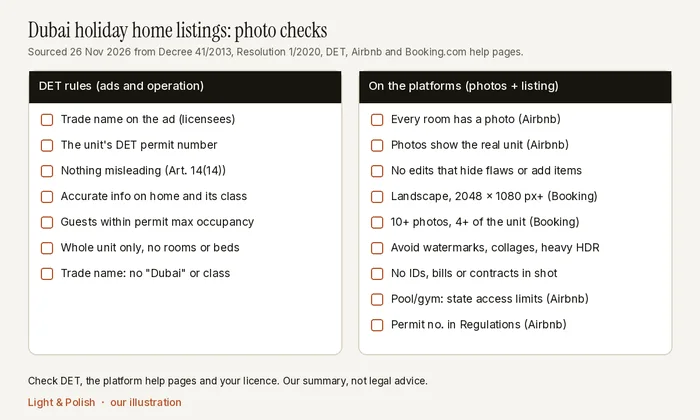
A Dubai holiday home has to clear two hurdles. First it needs a permit and a Standard or Deluxe class from DET, the Department of Economy and Tourism. Then it has to win over guests, who book from the photos. If the photos promise a bigger bed, an extra bedroom or a view the unit doesn't have, the guest notices at check-in, and the platform and the regulator both have rules on it. This guide is for Dubai agents and brokerages who also manage short-stay units, for holiday home operators, and for the photographers and editors they brief. It sets out what Dubai's holiday home legislation, DET, Airbnb and Booking.com say about advertising and photos, and turns it into a gallery checklist and a shot list.
We're the Light & Polish team. We edit listing photos for agents and hosts, including in Dubai; we don't shoot, license or manage holiday homes. We are not lawyers. Rules and help pages change, so check the linked pages, and ask DET or your compliance lead, before you rely on anything here. For sale and long-term rental ads on Bayut and Property Finder (Trakheesi permits, Madmoun QR codes, TruCheck), see our Bayut and Property Finder listing photo guide. This post covers the short-stay side.
Who sets the rules for holiday home listings in Dubai
Three documents sit behind every Dubai holiday home:
- Decree No. 41 of 2013 regulates leasing out holiday homes. It says no one may carry out the activity without a licence, and sets the licensee's duties (Decree No. 41 of 2013, Dubai Legislation Portal).
- Administrative Resolution No. 1 of 2020 is its implementing bylaw. It covers licences for operators, a separate permit for each unit, trade names, the licensee's obligations, including on advertising, and the two classes, Deluxe and Standard (Resolution No. 1 of 2020). Both texts call the regulator DTCM; DET now publishes the guide and runs the permit service.
- The Guide regulating the activity of leasing out holiday homes is listed in DET's legislation library as a first edition from 2022 (DET, Holiday Homes regulation guide 2022). Under Resolution 1 of 2020, the Guide sets the classification criteria and the technical requirements for licences and permits, and licensees must comply with it once it is published (Article 16). The PDF download returned an access error when we tried it on 26 November 2026, so we quote only the legislation and DET's service pages below, not the Guide itself.
The order matters for photos. DET's service page says "All apartments and villas must be registered and approved by DET prior to listing" (DET, apply for a holiday home permit). Its new-permit page lists the documents (title deed or approved DLD sale and purchase agreement, developer NOC if applicable, DEWA bill, property management letter), a delivery time of one business day, a final self-classification step, and a fee of AED 300 per bedroom plus AED 50 for the classification certificate and AED 20 in knowledge and innovation fees. DET gives a total of AED 370 (which works out to a one-bedroom unit) and says the fee is up to AED 1,200 per holiday home a year. It also says permits must, by law, be displayed in the unit (DET, new Holiday Homes permit). A permit is valid for one year and must be renewed before it expires (Resolution 1 of 2020, Article 10).
So the shoot can happen before the permit, but the gallery should not go live until there is a permit number to put on it.
What every holiday home ad has to carry
Article 14 of Resolution 1 of 2020 lists the licensee's obligations. Three of them bear directly on a listing:
- Trade name and permit number on every ad. The licensee must "include the Licensee's approved trade name and Permit number in all print and digital advertisements" (Article 14(13)), and use the approved trade name in all dealings with third parties (Article 14(12)).
- Nothing misleading. The licensee must "not promote, describe, or advertise Holiday Homes in a misleading way" (Article 14(14)).
- Occupancy. The licensee must comply with the maximum occupancy set in the holiday home permit (Article 14(15)).
The decree adds that a licensee must give guests "accurate and complete information on Holiday Homes and their classification categories", keep a notice board in Arabic and English showing the licensee's information and the class in a prominent place in each unit, and lease the home as a whole rather than as separate rooms or bed spaces (Decree 41 of 2013, Article 8(5), 8(7) and 8(11)). Fines under the decree run from AED 200 to AED 20,000, doubling for a repeat within a year up to AED 100,000 (Article 11).
On Airbnb, the permit number has a dedicated place. Airbnb's Dubai page asks hosts to add the Unit Holiday Home Permit Number to the listing, under Listing Editor, then Arrival Guide, Regulations, Add a Registration Number. It also says private rooms and shared rooms in residential properties are not allowed in Dubai (Airbnb, responsible hosting in Dubai).
Our reading for everything else: "all print and digital advertisements" has no carve-out for Instagram, a WhatsApp brochure or your own website, so a post or page that offers a stay should show the trade name and the permit number in its text or caption. Resolution 1 of 2020 also says an approved trade name may not include the word "Dubai" or the classification category (Article 13), so a logo watermark reading "Dubai Deluxe Stays" is worth checking against your licence. Ask DET if you are unsure how a format is treated.
One caveat for owner-hosts. Article 14 sets out the obligations of licensees, which Resolution 1 of 2020 defines as an individual or establishment licensed to conduct the activity, so the trade-name rule is written for operators. If you hold only a permit for your own unit, show the permit number in your ads and ask DET what name, if any, you should use with it.
Photos that match the permit
A holiday home gallery is checked against three things guests can verify on arrival: the class, the capacity and the unit itself.
Class. Airbnb says Dubai holiday homes are classified "Standard" or "Deluxe" based on the facilities provided, and that hosts choose the class according to the Guide's criteria. It also gives the Tourism Dirham guests pay: AED 15 per night for each occupied Deluxe bedroom and AED 10 for each Standard bedroom (Airbnb, Dubai). Guests pay a higher Tourism Dirham for a Deluxe bedroom, so we'd make sure a Deluxe listing's photos show the features the class was claimed on, and we wouldn't edit a Standard listing to look like a Deluxe one.
Capacity. Airbnb's ground rules say the listing should accurately describe the setup, including the number of bedrooms and the size of beds (Airbnb ground rules for hosts). Its Dubai page notes limits on the number of guests and visitors depending on unit size and bedrooms. We'd photograph every bed and sofa bed you count towards the guest number, make up the sofa bed for one shot if you count it, and never caption a study or maid's room as a bedroom unless that is how the unit is listed with DET.
The unit itself. Airbnb requires that "the photos and description on the listing page should accurately represent the space provided", with "some minor differences allowed for hotel-like representative inventory". That allowance is the only room for reuse. If an operator runs several near-identical units in one tower, we'd shoot each unit or at least each layout and floor band, so the view and the floor plan in the photos are the ones the guest gets.
What Airbnb and Booking.com ask of the photos
Many operators list on both Airbnb and Booking.com, and both publish photo rules:
| Airbnb | Booking.com | |
|---|---|---|
| Minimum size | At least 1024 x 683 px; its hosting guide suggests at least 1200 x 800 px and files up to about 10 MB | At least 2048 x 1080 px, preferably 4000 x 3000 px |
| Orientation | Landscape | Landscape (horizontal) only |
| How many | At least one photo of every room or space for the photo tour; the first 5 are shown most prominently | At least 10 photos; at least four of each room or unit (our reading: for a holiday home, the bookable unit is the whole apartment or villa) and at least one of the bathroom and toilet |
| Edits | Adjust brightness, contrast and highlights; crop, straighten, rotate. No AI or digital edits that hide flaws or damage or add amenities | Avoid over-processed photos, filters, strong contrast, over-saturation or excessive HDR, watermarks or illustrations, collages, stretched or distorted photos, black-and-white, extreme wide-angle or fisheye |
| Other | Shoot straight ahead, without tilting up or down; turn off the flash | Shoot from 3 to 5 feet high, from room corners. No images showing personal information such as ID cards, bills or contracts |
Sources: Airbnb, photo tour; Airbnb, photo tips; Airbnb, how to take great photos for your listing; Airbnb ground rules; Booking.com, understanding photo requirements.
Two of these catch Dubai galleries in particular. Booking.com asks partners to avoid watermarks, so our view is to keep the operator's logo off the photos there and put the trade name and permit number in the listing text. And because it doesn't allow images of ID cards, bills or contracts, a "proof" shot of the DEWA bill or the title deed doesn't belong in the gallery, and in our view nor does a photo of the permit. The permit belongs on the wall of the unit, as DET requires, and its number belongs in the listing fields.
A practical export: landscape, at least 2048 pixels wide and at least 1080 pixels tall, one master set that works on both platforms. Watch tight crops: a 2048 x 900 panorama is below Booking.com's minimum.
Which edits fit a holiday home gallery
A sale listing can be edited to show potential. A holiday home listing describes the stay a guest is paying for, so fewer edits are acceptable. Airbnb's ground rules name the edits it will ask hosts to remove: AI or other digital technology used "to edit flaws, hide damage, add amenities or attributes that are not part of a listing, or otherwise misrepresent the listing" (Airbnb ground rules). How we'd sort the usual requests:
- Fine: exposure, white balance, straight verticals, lens correction, crop, and blown-out windows brought back so the view can be seen. Airbnb's own guide lists brightness, contrast, highlights, crop, straighten and rotate.
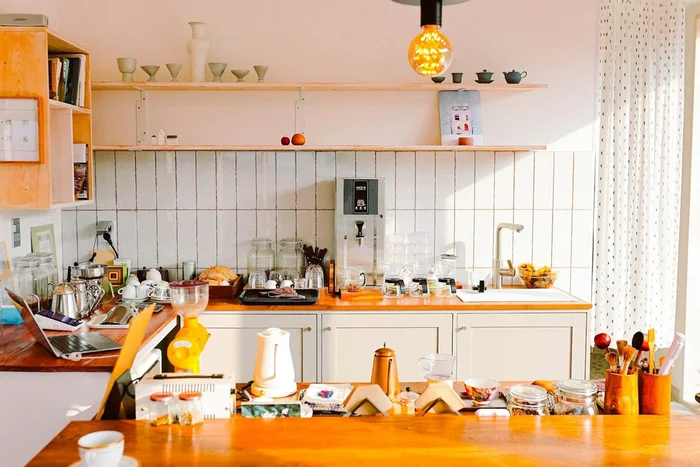
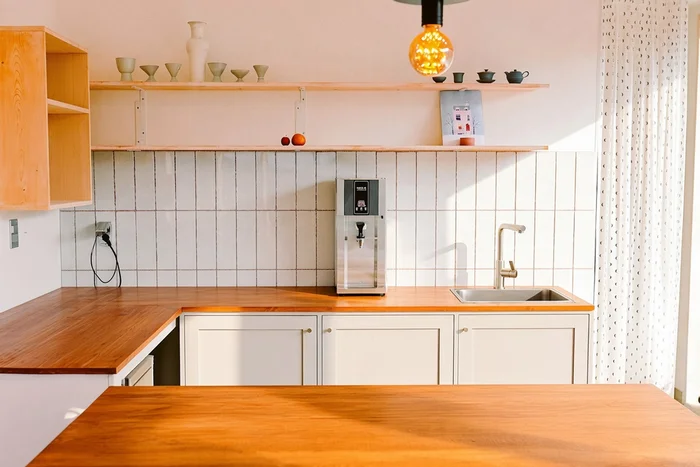
- Fine, with care: removing loose clutter such as cables, toiletries, bags and cleaning products. Keep anything you list as an amenity (kettle, coffee machine, hair dryer, iron) in at least one photo.
- Our view, keep off Booking.com: virtual twilight and heavy HDR looks. Booking.com asks partners to avoid over-processed images, filters and excessive HDR. If you use a dusk edit on your own website or Instagram, label it.
- Don't: virtual staging, added furniture or appliances, a replaced or "cleaned up" view (a crane, a building site, a road), a hidden stain or crack, a stretched room. A guest books what is in the photos; these edits are the ones Airbnb names, and Article 14(14) bars misleading advertising.
Be careful with the view. Airbnb asks hosts to disclose "any information about the surroundings that may impact the expected level of noise". If there is construction next door, don't clone it out of the balcony shot; show it, or say so. For how to word labels when you do use an AI edit, see our guide to disclosing AI-edited listing photos.
A shot list for a Dubai holiday home
Built from the Airbnb and Booking.com rules above, plus our own habits for short-stay apartments:
- Cover photo: the living room or the view, in landscape, lights on, blinds open. Airbnb asks for landscape photos, and Booking.com suggests keeping the subject in the centre of the frame.
- Living and dining: two or three angles from the corners, with the dining table laid for the number of guests the unit takes (our view).
- Each bedroom: a wide shot and a bed shot, so the bed size reads (our view). Booking.com asks for at least four photos of each room or unit, which, on our reading, for a holiday home means the whole bookable unit.
- Each bathroom: at least one; Booking.com asks for one of the bathroom and toilet.
- Kitchen: wide, plus the appliances you list as amenities.
- Balcony and view: from the unit's own balcony or window, not from the roof or a higher floor (our view).
- Building amenities guests can use: pool, gym, parking. Airbnb asks for any access limits, such as pool hours, to be disclosed, so add them to the listing text.
- Sofa bed made up, if it counts towards the guest number (our view).
- Not in the gallery: the permit on the wall, the notice board, keys with tags, bills or IDs (bills and IDs: Booking.com; the rest: our view).
Shoot straight ahead, as Airbnb suggests, from 3 to 5 feet high, as Booking.com suggests, and leave the wide-angle at a setting that keeps walls straight; Booking.com lists extreme wide-angle and fisheye shots among the images to avoid.
Common mistakes on Dubai holiday home listings (our view)
- The permit number is on Airbnb but missing from the Instagram post, the website page or the PDF sent on WhatsApp.
- One unit's photos reused for a second unit on a different floor or with a different view.
- A "4 guests" listing with photos of one double bed and an unmade sofa.
- Photos from before a refurbishment, or with furniture since replaced.
- A logo watermark on the Booking.com set.
- Virtual staging from the sale listing carried over to the short-stay listing.
A brief you can send your photographer or editor
- Unit: building, unit number, class (Standard or Deluxe) and maximum guests as on the DET permit.
- Deliver landscape files at least 2048 px wide and 1080 px tall; at least 10 images, at least four of the unit and at least one of every room; two per bedroom (wide and bed) is our own habit.
- Allowed: exposure, white balance, verticals, window pull, loose-clutter removal. Keep listed amenities in shot.
- Not allowed: added furniture or appliances, changed views, hidden damage or construction.
- Avoid: watermarks on the Booking.com set (Booking.com asks partners to avoid them).
- Keep the unedited originals with the date of the shoot, in case a platform or guest asks.
Earlier in a unit's life? Our post on off-plan renders vs real photos covers handover-day shoots, and our declutter guide covers what to clear before the camera comes out.
What it costs to have us edit the set
From our pricing and listing photos pages: first listing US$29, then US$32 per listing, or US$229 a month for regular listings (prices exclude local taxes). Edits come back within 24 hours, and you pay after delivery. We edit to the rules above: we'll correct light, colour and lines and clear loose clutter, and we'll say no to edits that change what a guest will find. If you'd like to judge the style first, send us one photo of a unit for a free sample edit at hello@lightandpolish.com or through our contact page. More on how we work with agents in the UAE is on our Dubai page.
Frequently asked questions
Does the DET permit number have to appear on Instagram posts and my own website?
Administrative Resolution No. 1 of 2020, Article 14(13), says a holiday home licensee must include its approved trade name and the permit number in all print and digital advertisements. It does not list exceptions for social media or your own website, so we would treat an Instagram post or a website page that offers a stay as an advertisement and show both. If you are unsure whether a post counts, ask DET. On Airbnb, the Unit Holiday Home Permit Number goes in the listing's Regulations section.
Can I use virtual staging or AI edits on holiday home photos in Dubai?
Airbnb's ground rules say it will ask hosts to remove content if AI or other digital technology has been used to edit flaws, hide damage, add amenities or attributes that are not part of a listing, or otherwise misrepresent the listing. Article 14(14) of Resolution 1 of 2020 also bars advertising a holiday home in a misleading way. A guest books the furniture that is in the photos, so our view is: don't virtually stage a holiday home. Exposure, colour, straightening and removing loose clutter are fine; changing the view, the finishes or the furniture is not.
Can I show the building pool and gym in a holiday home listing?
Yes, if guests can use them. Airbnb asks hosts to represent all available amenities accurately and to disclose restrictions on access, such as a pool that is only open at certain hours. If the building restricts guest access, say so in the listing text next to the photo.
What photo size do Airbnb and Booking.com ask for?
Airbnb asks for photos of at least 1024 x 683 pixels, and its hosting guide suggests at least 1200 x 800 pixels and files up to about 10 MB. Booking.com asks for landscape photos of at least 2048 x 1080 pixels, preferably 4000 x 3000, and at least 10 photos. Exporting in landscape at 2048 pixels wide or more and at least 1080 pixels tall covers both.
Our services: Real estate photo editing (first listing US$29) · Real estate photo editing dubai · Free listing photo checklist (PDF)
Related
- Real estate listing photo editing
- Off-plan renders vs real photos: what Dubai agents can show (2026)
- How to shoot a Dubai listing for Bayut and Property Finder
- Quebec listing photos: OACIQ AI label, French text and sold banners (2026)
- How much does drone photo editing cost for real estate? (2026 prices)
- How much does 360° virtual tour editing cost? (2026 prices)
- How much does real estate video editing cost? (2026 prices)
This article is general information, not legal advice. Rules change; check the linked official sources.