Blog · 29 Oct 2026 · 7 min read
Can you edit grass and landscaping in listing photos? What's allowed in 2026
Short version: correcting colour and exposure is fine. Replacing the sky is generally fine. Making a dead lawn look green, adding plants or changing the garden is not allowed under the MLS rules we've read, unless the seller will really do the work before closing, and then it must be labelled.
A tired lawn can make a good house look neglected, so it's tempting to fix it in editing. But landscaping is part of the property, and rules on altered listing photos have tightened. Here's where the line sits.
What the rules say
| Edit | CRMLS (California) | MLS Now | Our view |
|---|---|---|---|
| Brightness, exposure, colour correction | Not treated as altered | Minor cosmetic edits permitted | Fine |
| Sky replacement | Check guidance; don't change views | Permitted if views and surroundings aren't materially changed | Fine, done naturally |
| Removing bins, hoses, cars | Temporary items; label if altered | Disclosure rules apply | Fine, labelled where required |
| Greening a brown lawn | Cannot modify landscaping | Can't depict upgrades not present | No |
| Adding plants, turf or trees | AI-generated landscaping not permitted | Prohibited unless labelled as a rendering | No |
| Removing power lines or neighbours' buildings | Changes surroundings | Prohibited | No |
Sources: CRMLS Digitally Altered Images FAQ (2026), CRMLS knowledge base, MLS Now photo rules. Other MLSs, portals and countries differ; check yours. Not legal advice.
What you can do instead
- Fix the garden for real. Mow, edge, water for a week, rake leaves, and add fresh mulch. It shows in the photos and at the viewing.
- Shoot at the right time. Low, warm light hides patchiness better than harsh midday sun, without editing anything.
- Pick your angles. Lead with the angle that honestly shows the house at its best.
- Correct the colour accurately. A camera can make healthy grass look dull and yellow. Correcting that is allowed; turning brown grass green isn't.
- Replace a dead sky. A grey sky makes everything look flat, including the garden.
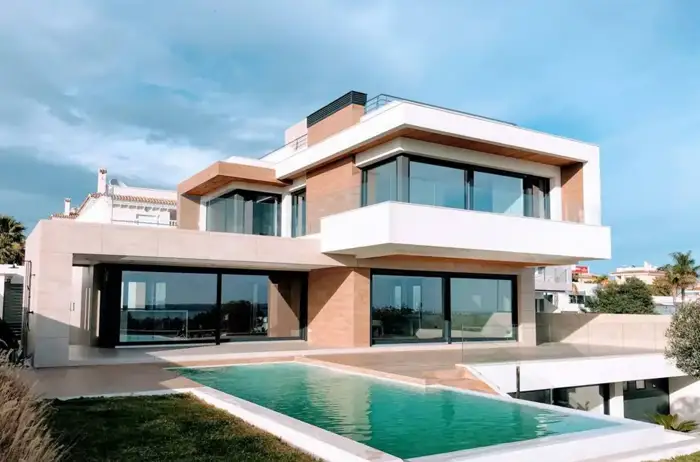
Before
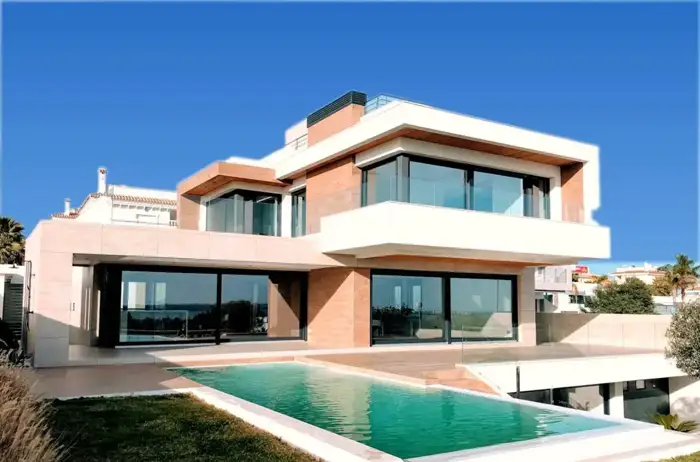
After: our sky replacement edit
In this demo only the sky was replaced and the colour balanced. The lawn, plants and house are as they were photographed.
The over-editing trap
Even legal edits can go too far. Neon grass and electric skies are the most common signs of an over-processed listing, and buyers notice. Our HDR vs flambient guide shows a demo of pulling an overcooked exterior back to natural.
A simple rule for agents
Ask: would a buyer standing on the pavement see what the photo shows? If the answer is yes, apart from the weather, the edit is almost certainly fine. If the answer is no, don't use it, or label it as your MLS requires.
Edit by edit: where each one usually falls
MLS rules usually separate three kinds of change: basic photo enhancement, removal or addition of temporary items, and changes to the property itself. Here's how common garden-related edits tend to fall. Your MLS may draw the lines differently.
| Edit | Usual category | Typical approach |
|---|---|---|
| Correcting a colour cast on grass and plants | Enhancement | Fine, as long as the result is realistic |
| Brightening a shaded garden | Enhancement | Fine |
| Removing a garden hose, toys or bins | Temporary items | Often allowed; check whether a label is required |
| Removing fallen leaves | Grey area | Better to rake before the shoot |
| Filling bare patches in a lawn | Changes condition | Avoid |
| Turning a brown lawn green | Changes condition | Avoid |
| Adding flowers, shrubs or trees | Adds features | Avoid, or present only as a clearly labelled rendering where rules allow |
| Removing a shed, fence or neighbour's house | Changes the property or surroundings | Avoid |
| Hiding pylons, power lines or a road | Changes surroundings | Avoid |
Why the rules have tightened
AI editing tools made it easy to turn a tired garden into a magazine cover in seconds. Buyers who visit and find something very different feel misled, and MLSs and regulators have responded. California's AB 723, for example, requires digitally altered listing images to be disclosed, with access to the unaltered versions, and CRMLS has published guidance on what counts as altered. Elsewhere, consumer protection law already prohibits misleading property marketing. In the UK, for instance, property descriptions must not mislead buyers, and that includes photos.
The practical lesson: an edited photo isn't automatically a problem. An edit that makes the property look different from what a buyer will find is.
A garden prep plan for sellers
Two to three weeks before
- Water the lawn regularly if conditions and local water rules allow. Even a partly recovered lawn photographs better than a dry one.
- Re-seed or lay turf on bare patches if the seller wants to; it's a real improvement buyers will see.
- Prune overgrown shrubs and cut back anything covering windows or paths.
Two to three days before
- Mow and edge the lawn.
- Weed beds and add fresh mulch or bark.
- Clean the deck, patio and outdoor furniture.
On the day
- Rake leaves, sweep paths and the drive.
- Put away hoses, tools, toys and bins.
- Open gates and garage doors only if they look tidy inside.
Photographing a garden at its best, honestly
- Time it. Soft morning or late-afternoon light makes grass and plants look richer and hides minor patchiness, without any editing.
- Choose the angle. Shooting from a slightly raised position, such as a deck or upstairs window, shows layout and size.
- Show the garden from the house and the house from the garden. Buyers want to understand how they connect.
- Use seasonal photos carefully. A summer photo of the garden is fine if it's labelled with the season, but don't present it as current if the garden has changed.
What to tell a seller who asks for a "green lawn" edit
A short, polite script: "I understand, and I'd love the lawn to look great. The MLS rules don't let us change the condition of the property in photos, and buyers who see a different lawn at the viewing often lose trust. Let's water and mow it before the shoot, pick the best light, and we'll correct the colour so it looks as good as it really does."
Checklist before you publish garden photos
- Grass, plants and trees look the way a visitor will see them.
- No permanent features added or removed.
- Any removal of temporary items is labelled where your MLS requires it.
- Sky replacements look natural and match the light on the house.
- Seasonal photos are labelled as such.
Labelling altered photos: practical tips
Where your MLS or local law requires a label, make it easy for buyers to see and understand:
- Put the label on or under the image, using wording such as "Digitally altered: temporary items removed" or "Virtually staged". Check whether your MLS specifies exact wording or placement.
- Keep the unaltered original and publish or link it where required. California's AB 723, for example, requires access to the unaltered image.
- Mention it in the remarks if your MLS allows, so the information isn't lost when photos are syndicated to other portals.
- Keep records of which photos were edited and how. If a buyer queries a photo, you can answer quickly.
Questions to ask your editor about garden edits
| Ask | Why |
|---|---|
| Do you change grass, plants or trees in any way beyond colour correction? | Some editors "enhance" lawns by default |
| Will you flag any edit that may need a label? | You're responsible for disclosure, so you need to know |
| Can you send the unedited files with the edited ones? | Needed where rules require originals |
| How do you handle sky replacements around trees? | Poor masking leaves halos around branches, which looks fake |
| Can you match the sky to the direction of light on the house? | A sunny sky over a shaded house looks wrong |
When a rendering is the right answer
Sometimes a seller has real, planned landscaping work, or a new-build has no garden yet. In those cases, an artist's impression or landscape rendering can help buyers imagine the finished result, but present it as exactly that: a rendering, clearly labelled, ideally with a note on what will be completed and when. Don't place it among the photos as if it were the current property, and check your MLS rules on whether renderings are allowed in the photo set at all.
Edits we do, and don't
We correct colour and exposure, straighten, replace skies, create twilight lead photos and remove temporary clutter. We don't green lawns, add landscaping or remove permanent features. US$29 for your first listing, then US$45 per listing or US$229 a month, within 24 hours, and you pay after delivery. See examples and prices.
Frequently asked questions
Can I make a brown lawn look green in listing photos?
In the MLS rules we've read, no. CRMLS says users cannot modify real parts of the property, including landscaping, and does not permit AI-generated landscaping images in the MLS. Basic colour and exposure correction is fine, but not to make dead grass look healthy.
Is sky replacement allowed?
Generally yes, because the sky isn't part of the property. MLS Now permits sky replacement that does not materially change views or surroundings, with its disclosure rules. Check your own MLS.
What if the seller is going to re-turf before closing?
CRMLS guidance says landscaping changes may be shown only if the seller will actually make them as part of the listed price. Even then, label the image and follow your MLS's rules.
Will you green a lawn if I ask?
No. We'll correct colour and exposure, replace a dull sky and tidy temporary items, but we don't change permanent features or condition. Listing edits are US$29 for your first listing, then US$45 per listing or US$229 a month.
Related
- Real estate listing photo editing
- Day to dusk photo editing: free tools, DIY and paid services compared
- How to declutter real estate photos: before the shoot and in editing
- HDR vs flambient real estate photos: what agents should know (and ask for)
- How to make listing photos look better: 12 fixes, in the order that matters
- Is virtual staging legal, and is it worth it? A realtor's guide
- How to outsource real estate photo editing (and choose the right editor)
This article is general information, not legal advice. Rules change; check the linked official sources.