Blog · 29 Oct 2026 · 8 min read
How to make listing photos look better: 12 fixes, in the order that matters
Short version: fix the room first, shoot level and bright, then edit for accuracy rather than drama. Exposure, white balance and straight verticals do more for a listing than any filter. Bigger edits such as sky replacement, twilight and declutter help when they're used honestly and labelled where your MLS asks.
Buyers scroll fast. A dark kitchen or a yellow living room loses them before they've read the price. The good news is that most weak listing photos share the same few problems, and almost all of them can be fixed with preparation and a careful edit. This guide goes through them in the order that makes the biggest difference.
Before the shoot: fixes no editor can match
- Open every blind and switch on every light. Even daytime lamps add warmth and stop corners going grey. Replace dead bulbs, and try to use bulbs of the same colour in each room so the light doesn't clash.
- Declutter surfaces. Clear benchtops, fridge doors, bathroom vanities and the floor. Hide bins, cables, pet bowls and toiletries. Close toilet lids. Five minutes of tidying beats an hour of retouching.
- Move cars, bins and hoses outside. The front exterior is usually the lead photo. Give it a clear driveway and a tidy path.
- Pick the time of day. Exteriors look best when the front of the house is lit and the sun isn't directly behind it. If the weather won't cooperate, a sky replacement or a twilight edit can rescue the shot later.
During the shoot: camera habits that save the edit
- Keep the camera level. Tilting up or down makes walls lean in. Shoot at about chest height, turn on the grid, and keep vertical lines vertical. Small tilts can be corrected later, but big ones cost you the edges of the frame.
- Shoot from corners and doorways. Two walls meeting in a corner give a room depth. Show a glimpse of the next room so buyers understand the flow.
- Use a wide lens fairly. A wide lens helps small rooms, but stretching a box room to look like a hall disappoints buyers at the viewing. Prefer 1x on a phone where the room allows it.
- Take bracketed or extra exposures for bright windows. If your camera or phone allows it, take a darker frame for the window view. It gives the editor something to work with. (See our guide to HDR vs flambient for how pros handle this.)
In editing: the fixes that matter most
- Exposure and white balance. This is the big one. Interiors shot under warm bulbs come out orange; shady rooms come out blue. A neutral white balance makes white walls white and wood look like wood. Our colour correction guide goes into detail.
- Straighten and crop. Correct leaning verticals, level horizons and crop away distracting edges. These are standard adjustments in every MLS rulebook we've seen.
- Replace a dead sky. A flat white sky drains colour from the whole exterior. A natural, lightly clouded blue sky with matched light makes the house look like it did on a good day.
- Remove temporary clutter, carefully. Bins, cables, a stray towel: fine to remove. Permanent features, defects, power lines or the neighbour's house: never.
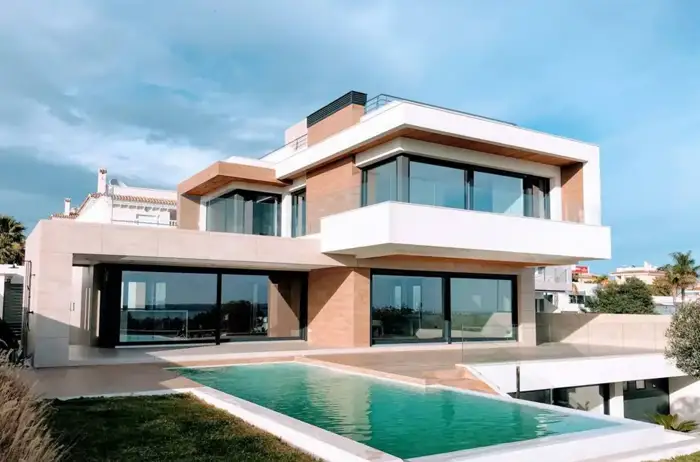
Before
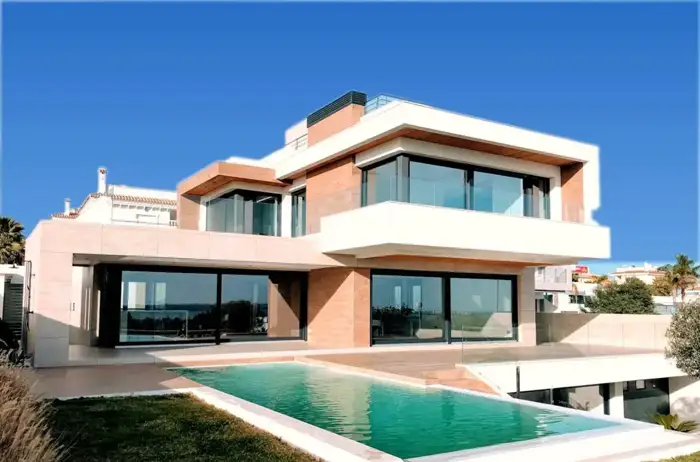
After: our sky replacement edit
Here's what a careful sky edit looks like. The house, lawn and trees are unchanged. Only the sky was replaced and the colour balanced to match. Drag the slider to compare.
Which edit fixes which problem?
| Problem you see | Cause | Fix | Label needed?* |
|---|---|---|---|
| Rooms look dark or grey | Underexposure, lights off | Lights on at the shoot; exposure and shadow lift in editing | No |
| Everything looks yellow or orange | Warm bulbs, auto white balance | White balance and colour correction | No |
| Windows are pure white | Bright outside, dark inside | Extra exposure for the window, blended; or flash | No |
| Walls lean in | Camera tilted | Shoot level; vertical correction | No |
| Grey, flat sky | Overcast day | Sky replacement | Check your MLS |
| Exterior lacks appeal | Midday light | Virtual twilight for the lead photo | Check your MLS |
| Clutter on surfaces | Not prepped | Tidy at the shoot; declutter edit | Often yes |
| Empty rooms feel cold | Vacant property | AI-assisted or designer virtual staging | Yes |
*Rules vary by MLS, portal and country. CRMLS (California) and MLS Now publish clear guidance; read your own MLS's rules before you upload. This isn't legal advice.
What not to do
- Don't over-saturate. Neon-green lawns and electric-blue skies look fake, and buyers notice. Our guide on grass and landscaping edits explains where the line is.
- Don't hide defects. Removing a crack, a damp patch or a power line misrepresents the property.
- Don't mix looks. One listing, one style. Use the same sky and the same colour approach across every photo.
The quick checklist
- Blinds open, all lights on, bulbs matched
- Surfaces clear, toilet lids down, cars moved
- Camera level, chest height, corners and doorways
- Exposure and white balance corrected on every photo
- Verticals straight, consistent sky across the exteriors
- Any staging or object removal labelled as your MLS requires
A room-by-room shot list
Most listing sets are too long in the wrong places and too short in the right ones. Buyers scroll fast; they want the rooms that sell the home, in a sensible order, without six near-identical bedroom angles. This is a practical starting point for a typical three-bedroom house. Adjust it to the property.
| Room or area | Shots | What to capture | Watch out for |
|---|---|---|---|
| Front exterior | 2–3 | Straight-on and a three-quarter angle; one wider shot showing the street setting | Cars on the drive, bins, sun directly behind the house |
| Entry or hallway | 1 | The first view a buyer gets on walking in | Shoes, coats, a mirror reflecting the photographer |
| Living room | 2–3 | From the doorway and from the far corner, showing light and flow to the next room | TV glare, cables, cushions out of place |
| Kitchen | 2–3 | One wide, one showing the work area, one detail if the finishes are a selling point | Fridge magnets, dish racks, mixed bulb colours |
| Dining | 1 | The table and its link to the kitchen or garden | Chairs pulled out at random angles |
| Main bedroom | 2 | From the doorway and from the corner opposite the bed | Unmade bed, phone chargers, clothes on chairs |
| Other bedrooms | 1 each | One clean corner shot | Children's names on walls (privacy), clutter |
| Bathrooms | 1 each | From the doorway, slightly to one side so you're not in the mirror | Toilet lid up, toiletries, your reflection |
| Garden and outdoor space | 2–3 | The garden from the house, and the house from the garden | Hoses, toys, harsh midday shadows |
| Features | 1–3 | Fireplace, view, garage, laundry, home office | Shooting things that aren't really features |
That comes to roughly 20–30 photos, which suits most portals. Put the best exterior first, then follow the order a buyer would walk through the home.
Worked example: fixing a weak listing set
Here's a common situation, described step by step so you can apply it to your own photos. An agent sends 34 phone photos of a three-bedroom house taken on a cloudy afternoon. Typical problems: grey sky in every exterior, a yellow cast in the kitchen from warm downlights, walls leaning in the bedrooms because the phone was tilted, and three almost identical shots of the living room.
- Cull first. Remove duplicates and anything blurred. Keep the strongest one of each angle. 34 photos become 26.
- Order the set. Best exterior first, then entry, living, kitchen, dining, bedrooms, bathrooms, garden.
- Fix verticals and level on every interior. This alone makes the set look far more professional.
- Correct colour so the walls look like the paint they are, and match the kitchen to the rest of the set. See our colour correction guide.
- Balance exposure so rooms are bright without losing the view through the windows.
- Replace the sky on the exteriors with a believable, soft sky that matches the light on the house. See our sky replacement guide.
- Remove temporary items such as the bins and a hose, and note them so you can label the photos where your MLS requires it.
- Consider one twilight lead photo if the house has good exterior lighting. See virtual twilight.
- Final check at phone size. Look at the whole set as small thumbnails. Anything that jumps out as darker, warmer or more "processed" than the rest needs another pass.
Seller prep checklist to send before the shoot
Most of the improvement in listing photos happens before anyone presses the shutter. Copy this list into your pre-shoot email to the seller.
- Open all curtains and blinds; replace any dead bulbs, ideally with bulbs of the same colour.
- Clear kitchen worktops except one or two attractive items.
- Remove fridge magnets, notes and photos from the fridge door.
- Make beds with plain, smooth bedding; put away clothes, shoes and bags.
- In bathrooms, remove toiletries, bins and bath mats; close the toilet lid; hang clean towels.
- Remove personal photos and anything with names, addresses or children's details.
- Move cars off the driveway and bins out of sight; coil or remove hoses.
- Mow the lawn and sweep paths a day or two before.
- Put pets and pet bowls out of shot.
- Turn off ceiling fans and TVs.
Our declutter guide explains what an editor can and can't remove afterwards, and which removals need a label.
How to judge your own photos
Before you upload, look at the set and ask five questions. Are the vertical lines vertical? Do white walls look white? Is every room bright, with detail still visible through the windows? Does the set look like it was taken on one day, in one style? Would a buyer who visits recognise every room? If any answer is no, that's the photo to fix or replace.
Want us to do the editing?
We edit listing photos for agents in the US, UK, Canada and Australia: colour and exposure correction, straightening, sky replacement, virtual twilight, declutter and labelled AI-assisted staging. Your first listing is US$29, then US$45 per listing or US$229 a month. We deliver within 24 hours, and you pay after delivery. See examples and prices, or send us one photo for a free sample edit.
Frequently asked questions
What is the single biggest improvement for listing photos?
Light. Open every blind, switch on every lamp, and shoot when the rooms are evenly lit. Then correct exposure and white balance in editing. Most dull listing photos are simply too dark or too yellow.
Which edits are allowed without disclosure?
In the MLS rules we've read (for example CRMLS and MLS Now), brightness, exposure, colour correction, white balance, straightening, cropping and sharpening are treated as normal adjustments. Adding, removing or changing anything in the property, including virtual staging, needs a label, and some MLSs also require the original photo. Always check your own MLS.
How many photos should a listing have?
Enough to show every room a buyer will ask about, plus the exterior, the street view and the outdoor space. Your MLS or portal sets the maximum. Quality and order matter more than count: lead with your strongest exterior and main living space.
How much does it cost to have you edit a listing?
US$29 for your first listing, then US$45 per listing, or US$229 a month if you list regularly. We deliver within 24 hours and you pay after delivery.
Related
- Real estate listing photo editing
- Day to dusk photo editing: free tools, DIY and paid services compared
- How to declutter real estate photos: before the shoot and in editing
- Can you edit grass and landscaping in listing photos? What's allowed in 2026
- HDR vs flambient real estate photos: what agents should know (and ask for)
- Is virtual staging legal, and is it worth it? A realtor's guide
- How to outsource real estate photo editing (and choose the right editor)
This article is general information, not legal advice. Rules change; check the linked official sources.