Blog · 29 Oct 2026 · 6 min read
HDR vs flambient real estate photos: what agents should know (and ask for)
Short version: both methods solve the same problem: a bright window in a darker room. HDR merges several exposures; flambient blends a flash frame with natural light. Either can look great. What buyers dislike is the over-processed "HDR look", so ask for natural results whichever method is used.
The problem both methods solve
A camera can't capture a sunny garden and a shaded living room in one exposure. Expose for the room and the windows turn white. Expose for the window and the room turns black. Real estate photographers work around this in two main ways.
HDR in plain English
HDR (high dynamic range) means taking several photos of the same view at different brightness levels, usually three to five, then merging them. The dark frames hold the window detail; the bright frames hold the shadows. Phones do a version of this automatically.
- Good: fast on site, needs no flash, consistent, and works well outdoors.
- Risks: it's easy to overdo. Over-processed HDR has glowing halos round the roof, grey "dirty" whites, crunchy detail and oversaturated grass.
Flambient in plain English
Flambient (flash plus ambient) combines a natural-light frame with one or more flash frames. The flash gives clean, neutral colour; the ambient frame keeps natural shadows. A separate window pull frame, exposed for the outside, is blended in for the view.
- Good: accurate colour in mixed light, crisp detail and depth.
- Risks: slower on site, more editing, and poor flash work shows as glare on shiny surfaces and harsh shadows.
Side by side
| HDR | Flambient | |
|---|---|---|
| How it works | 3–5 exposures merged | Flash frame + ambient frame (+ window pull) |
| Time on site | Quicker | Slower |
| Editing | Simpler, but easy to overdo | More manual blending |
| Colour in mixed light | Can turn yellow or muddy | Usually cleaner |
| Typical failure | Halos, grey whites, neon grass | Glare, flat or harsh light |
| Best for | Exteriors, quick shoots | Key interiors, high-end listings |
The "HDR look", and how to undo it
The demo below shows an exterior with a typical over-processed finish: a fiery sky, glowing greens and heavy contrast. Our edit pulls saturation and contrast back so the house looks like a real place on a real evening.
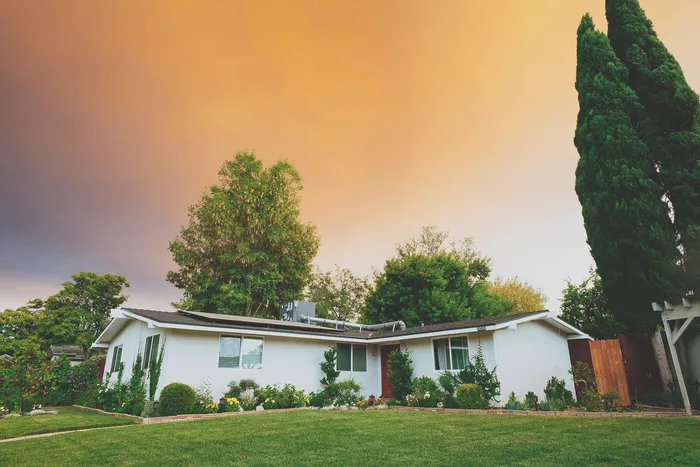
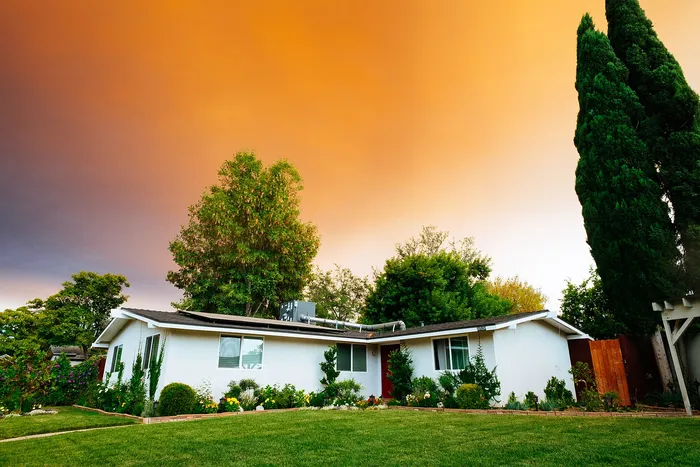 BeforeAfter · Demo on stock photo
That's the same principle we follow on every listing: the edit should make the photo accurate and appealing, not dramatic. If buyers feel misled at the door, a striking photo has done its job badly.
What to ask your photographer or editor
- "Natural colour, windows showing the real view." That single brief prevents most problems.
- "Send me the brackets or flash frames, too." They let an editor re-blend if you need changes later.
- "One look across the whole listing." Consistent white balance and sky across every photo.
- "No changes to the property." Blending exposures is fine. Adding views, removing power lines or greening lawns isn't. See our guide on landscaping edits.
Shooting on a phone?
Your phone is already merging exposures. Keep it level, tap to expose on the room rather than the window, and avoid the strongest "vivid" modes. Our iPhone listing photos guide covers the details.
How each method works, step by step
A typical HDR (bracketed) workflow
- The camera is set on a tripod so every frame lines up.
- Three to seven frames are taken at different exposures, from dark (for the windows) to bright (for the shadows).
- Software merges the frames into one image with a wider range of light.
- The editor tone-maps the result, setting contrast, colour and highlights. This step decides whether the photo looks natural or "HDR".
- Verticals, colour and any local fixes are done last.
A typical flambient workflow
- The camera is on a tripod.
- An ambient frame records the room as it looks in its own light.
- One or more flash frames light the room evenly, often by bouncing a flash off the ceiling.
- Extra frames may be shot for the window view.
- The editor blends the frames by hand in layers: flash for clean colour and detail, ambient for mood, window frames for the view.
Which suits which property?
| Situation | Usually better | Why |
|---|---|---|
| Bright modern home, white walls | Flambient | Clean, neutral colour; crisp whites |
| Big windows with a view that sells | Flambient with window frames | Most reliable way to keep the view clear |
| Fast-turnaround, mid-market listing | Well-processed HDR | Faster to shoot; good results with restrained editing |
| Warm, characterful older home | Either, edited gently | Ambient mood matters; avoid over-neutralising |
| Agent shooting on a phone | Phone's own HDR plus careful editing | No tripod or flash; rely on good light and correction |
Signs a photo has been over-processed
- Grey, flat walls with no real shadows.
- Halos: a bright glow around window frames and rooflines.
- Skies that are too dark or too saturated compared with the house.
- Grass and trees that look neon.
- Dirty-looking colour in white areas, often green, grey or magenta.
- Gritty detail on wood and fabrics from heavy "clarity".
Any of these can be fixed in editing, at least partly. The demo above shows an exterior pulled back from a strong HDR look.
Choosing a photographer: questions with good answers
| Question | A good answer sounds like |
|---|---|
| Do you shoot HDR, flambient or both? | A clear answer, with sample galleries of each |
| How do you handle windows? | Explains window frames or blending, shows examples with clear views |
| Can I see a full listing set, not just highlights? | Yes, sends a complete gallery |
| What's your turnaround? | A specific time, such as next day |
| What edits do you include, and which need disclosure? | Knows your MLS rules on altered images |
Checklist: a natural-looking final photo
- Windows show the view, without glowing halos.
- Walls have gentle, real shading.
- White surfaces are neutral.
- Colour and brightness match across the set.
- The photo looks like the room on a good day, not a painting.
Can an editor turn HDR into a flambient look?
Partly. An editor can't add flash light that was never captured, but they can make a bracketed HDR set look much cleaner: neutralising grey or green casts, restoring natural contrast, reducing halos around windows and bringing oversaturated skies and lawns back to realistic colour. What they can't fully fix is a window view that was completely white in every frame, or deep colour casts in rooms where only one mixed light source was recorded.
If you're commissioning a shoot for a high-value property with big windows, ask for flambient or for extra window frames. For an everyday listing, well-shot brackets with careful editing are usually enough.
What to send your editor
- For HDR: every bracket in each set, in the order shot, without renaming files individually. Say how many frames are in each bracket.
- For flambient: the ambient frame, every flash frame and any window frame for each angle, grouped in folders per room.
- Original RAW files where possible, not exported JPEGs.
- A reference image of the look you want, ideally from your own past listings.
- Notes on anything that must not be changed, such as a feature wall colour.
Cost and turnaround: what affects it
Flambient editing is usually priced higher than simple HDR merging, because each image is blended by hand from several frames. Turnaround depends on the number of images and the method. When you compare editors, compare like with like: per image or per listing, the number of revisions included, and whether colour correction, sky replacement and vertical correction are included in the base price.
Have us blend or re-grade your photos
Send your brackets, flash frames or finished photos and we'll produce a natural, consistent set, with colour correction, window views, straight verticals and a matched sky. US$29 for your first listing, then US$45 per listing or US$229 a month, within 24 hours, and you pay after delivery. See examples and prices.
Frequently asked questions
Is HDR or flambient better for listing photos?
Neither is always better. Flambient usually gives cleaner colour and more depth in interiors, but takes longer on site and in editing. HDR is quicker and works well, especially for exteriors, as long as it isn't over-processed. Many photographers use both.
What is a window pull?
An extra exposure taken for the view outside a window, then blended into the main photo so the window shows the garden or street instead of a white glare. It's a standard technique, not an alteration of the property, as long as the view is the real one.
Can you fix photos that look over-processed?
Often, yes. If the original files are available we can re-blend them. If only the finished JPEGs exist, we can usually pull back saturation, halos and contrast so the photo looks natural again, as in the demo above.
Do you blend brackets?
Yes. Send the brackets or flash frames and we blend them as part of a listing edit: US$29 for your first listing, then US$45 per listing or US$229 a month, delivered within 24 hours, and you pay after delivery.
Related
- Real estate listing photo editing
- Day to dusk photo editing: free tools, DIY and paid services compared
- How to declutter real estate photos: before the shoot and in editing
- Can you edit grass and landscaping in listing photos? What's allowed in 2026
- How to make listing photos look better: 12 fixes, in the order that matters
- Is virtual staging legal, and is it worth it? A realtor's guide
- How to outsource real estate photo editing (and choose the right editor)
This article is general information, not legal advice. Rules change; check the linked official sources.