Blog · 29 Oct 2026 · 7 min read
Real estate photo colour correction: fixing yellow, blue and mixed-light interiors
Short version: yellow or blue listing photos are a white balance problem, not a camera problem. Correcting the colour makes white walls white and wood look like wood. It's a standard adjustment that MLS rules allow, as long as you don't change the colour of anything that's really in the house.
Why listing photos get a colour cast
Every light source has a colour. Daylight from a window is cool and bluish. Most household bulbs are warm and orange. Your eye adjusts without you noticing, but a camera has to guess, and in a room lit by both it often guesses wrong. You get one of three results:
- Too warm: orange walls, yellow ceilings and muddy wood floors. Common at night or in rooms with lamps on.
- Too cool: blue-grey rooms that feel cold, common in shade or on overcast days.
- Mixed: a blue window wall next to an orange lamp corner. This is the hardest case and the most common in real homes.
White walls and ceilings show it most, because they reflect whatever colour falls on them.
Before and after
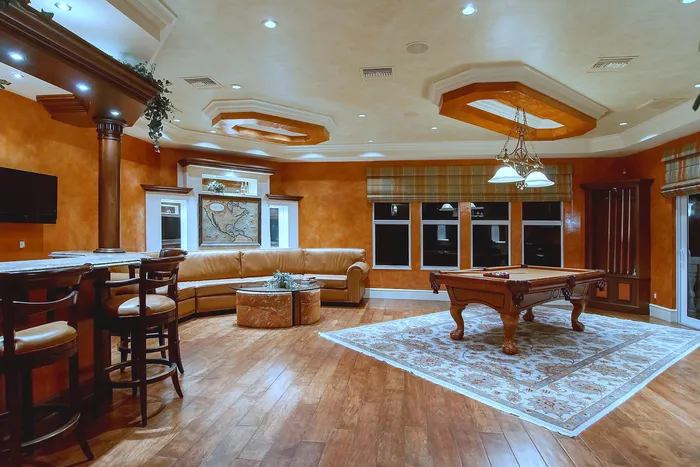
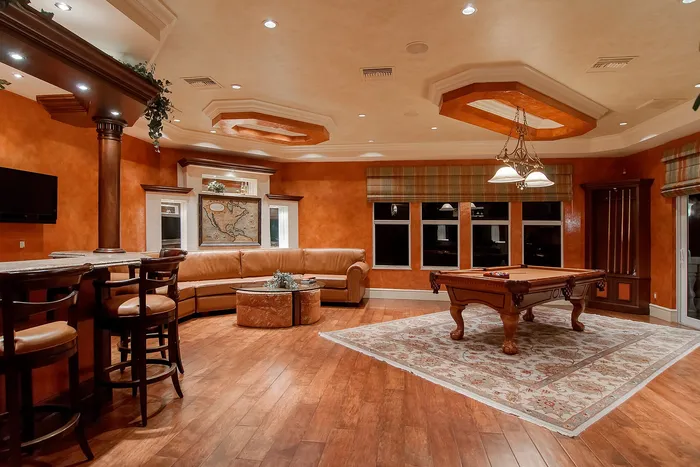 BeforeAfter · Demo on stock photo
In this demo the room has a strong orange cast from warm downlights. After correction the ceiling reads as off-white, the rug is closer to its real cream and the wood keeps its warmth without turning everything orange. The paint colour isn't changed: the walls are genuinely a warm tone, so they stay warm.
How colour correction is done
- Find a neutral. A white ceiling, a door frame or a grey tile should have no colour. Setting the white balance from it removes most of the cast in one step.
- Set temperature and tint. Temperature runs blue to yellow; tint runs green to magenta. Fluorescent and some LED lights add a green tint that needs pulling back.
- Fix local areas. If one part of the room is lit differently, such as a window wall, correct it separately with a mask.
- Keep it consistent. Match every photo in the listing to the same neutral so the rooms look like one home.
- Check skin-tone objects. Wood, leather and food should look natural, not grey. Over-correcting a warm room makes it look clinical.
DIY or editor?
| Phone app auto-fix | Lightroom / editing software | Editing service | |
|---|---|---|---|
| Cost | Free or low | Subscription | Per listing (ours: US$45, first listing US$29) |
| Mixed light | Often struggles | Good, with masks and time | Handled for you |
| Consistency across 25+ photos | Varies photo to photo | Good, with presets and sync | Matched across the set |
| Your time | Minutes | Your own time on every listing | Upload and wait (we deliver within 24 hours) |
If you list a few homes a year, an app plus care at the shoot may be enough. If you list regularly, the time saved usually pays for an editor. See software vs service for a fuller comparison.
What's allowed under MLS rules
The rules we've read draw the line clearly. CRMLS's 2026 FAQ says minor adjustments such as brightness, colour correction, sharpening and lighting aren't covered by its digitally altered image rule. The San Diego MLS FAQ on California's AB 723 says the same. What isn't allowed is changing a real part of the property, which includes its wall colour. So correct the light, not the paint.
Rules vary by MLS and country. Check yours before uploading.
How to brief an editor on colour
- Say what's true: "walls are pale grey", "floors are light oak". It stops an editor guessing.
- Send all photos of the listing together so they can be matched.
- If a room had mixed light, mention it. A frame with lamps off helps.
- Ask for natural, not "bright and airy" at any cost. Over-whitened rooms look fake.
Fixing the four most common colour problems
1. The yellow kitchen
Warm downlights or under-cabinet lights push the whole kitchen yellow or orange. Set white balance from a white cabinet door or the ceiling, then check the worktop and splashback still look like their real materials. If the warm light is part of the room's character, keep a little warmth in the lit areas but bring the walls and ceiling back to neutral.
2. The blue bedroom
Rooms lit only by daylight on an overcast day go cool and blue, especially on north-facing sides in the northern hemisphere. Warm the white balance until white bedding looks white rather than grey-blue. Don't overdo it: a slightly cool, fresh bedroom is fine; a yellow one is not.
3. Mixed light in one frame
The hardest case: a blue window wall next to an orange lamp corner. A single white-balance setting can't fix both. Editors use local adjustments: neutralise the overall image to the daylight, then selectively cool the warm corner (or the reverse). In flambient workflows, the flash frame provides clean, neutral colour that's blended in. See HDR vs flambient.
4. Colour bounce from walls, floors and grass
Strong colours reflect onto nearby surfaces. A green lawn can tint a white ceiling green through a big window; orange timber floors can warm white walls. Editors reduce the specific tint on the affected surface rather than shifting the whole image, so the floor stays the colour it really is.
Keeping a whole set consistent
A buyer scrolling through 25 photos notices if the kitchen is warm, the lounge is cool and the bathroom is green. Consistency matters as much as accuracy. A practical routine:
- Correct one "hero" interior first, usually the living room.
- Use it as the reference for every other room shot in similar light.
- Look at all thumbnails side by side and adjust any outlier.
- Keep exteriors natural: the sky and grass should look like the day they were taken, not boosted.
- Check on a phone screen, because that's where most buyers will see them.
Colour correction checklist
- White walls and ceilings read as white or the real paint colour.
- Timber, stone and tiles look like the actual materials.
- No green or magenta tint in shadows.
- Lamps look warm but don't flood the room orange.
- Window views are visible and look like daylight.
- Saturation is natural; nothing looks neon.
- All photos in the set look like one shoot.
Monitors and phones: why it looks different on each
If you edit your own photos, your screen matters. Many laptop screens are set cool and very bright, and phones often boost saturation. Two simple habits help: turn off automatic "warm" or night-shift display modes while editing, and check the final set on at least one other device. Professional editors work on calibrated monitors, which is one reason outsourced colour work tends to look consistent across portals.
Example brief for a mixed-light listing
"Please correct white balance so walls look like their real colour (white in most rooms, pale grey in the main bedroom). Keep lamps looking warm but stop the orange spilling across the kitchen ceiling. Keep window views visible. Please don't change any surfaces, furniture or the garden. Match all interiors so the set looks consistent."
Fixing colour on exteriors
Exterior colour problems are different from interior ones. Common issues and fixes:
- Blue cast on a cloudy day: warm the white balance slightly until render, brick or timber look natural.
- Orange cast in late-afternoon sun: some warmth is attractive, but bring white trim and window frames back towards white.
- Washed-out grass and plants: restore natural saturation; don't push greens until they look artificial or misrepresent the garden.
- Sky colour mismatched with the house: after a sky replacement, make sure the light and colour on the house match the new sky.
Accurate exterior colour matters for honesty too. Buyers notice if the house is a different colour from the photos.
Get it done for you
Colour and exposure correction are part of every Light & Polish listing edit, along with straightening, sky replacement, twilight and declutter when you need them. See prices and examples, or email one photo for a free sample edit.
Frequently asked questions
Why do my interior photos look yellow?
Most indoor bulbs are warm, and cameras and phones often don't fully correct for them, especially when daylight from windows mixes with lamp light. The result is an orange or yellow cast, strongest on white walls and ceilings.
Is colour correction allowed in MLS photos?
Yes, in the rules we've read. CRMLS and San Diego MLS both list colour correction, white balance and exposure among the normal adjustments that don't count as 'digitally altered'. Changing the colour of a real feature, such as painting the walls a different colour, is not allowed.
Can you fix mixed lighting from windows and lamps?
Usually, yes. We neutralise the overall cast, then correct areas where the light colour differs, for example a cool window wall next to a warm lamp. Very strong mixed light is easier to fix if you also send a frame with the lamps off.
What does colour correction cost with you?
It's included in every listing edit: US$29 for your first listing, then US$45 per listing or US$229 a month, delivered within 24 hours. You pay after delivery.
Related
- Real estate listing photo editing
- Day to dusk photo editing: free tools, DIY and paid services compared
- How to declutter real estate photos: before the shoot and in editing
- Can you edit grass and landscaping in listing photos? What's allowed in 2026
- HDR vs flambient real estate photos: what agents should know (and ask for)
- How to make listing photos look better: 12 fixes, in the order that matters
- Is virtual staging legal, and is it worth it? A realtor's guide
This article is general information, not legal advice. Rules change; check the linked official sources.