Blog · 29 Oct 2026 · 6 min read
Virtual staging cost in 2026: per-photo prices for AI and designer staging
Short version: designer virtual staging costs about US$16–35 a photo on the public price lists we checked; AI tools cost under US$1 to about US$3 a photo if you use every credit. The real number to compare is cost per listing, including retries and rush fees. Always label staged photos.
Virtual staging adds furniture to photos of empty rooms so buyers can picture the space. It's far cheaper than physical staging, but the price you pay depends heavily on how you buy it. Here's what the published prices actually look like, and what they leave out.
Published prices (checked October 2026)
These come from each company's public pricing page, or from independent comparisons that link to them. We haven't tested the quality of these services, and prices change often.
| Service | Type | Published price | Source |
|---|---|---|---|
| VirtualStaging.com | Designer | $24 per image; 20 photos for $288 | pricing page |
| Stuccco | Designer | $35 pay-as-you-go; $24.50–28 with prepaid bundles ("add furniture/decor") | pricing page |
| BoxBrownie, Styldod | Designer | About $16–24 per photo | comparison, 24 Oct 2026 |
| AI staging tools (10 compared) | AI | About $0.33–3.26 per photo on each tool's cheapest paid plan | StagingBench, 19 Oct 2026 |
Prices in USD as published; taxes and currency may differ. Not an endorsement of any service.
Cost per photo vs cost per listing
A low per-photo price usually assumes you use a full monthly allowance or pay a year up front. The comparison sites above point out the same catches:
- Unused credits: a plan that's cheap at 150 photos a month becomes expensive if you only stage 20.
- Rush fees: some designer services charge extra for 12- or 24-hour delivery.
- Reruns: with AI tools, each retry usually costs another credit. Designer services tend to include revisions.
- Other edits: staging alone doesn't fix a dark or yellow photo. Colour and exposure correction may be a separate charge.
So work out the cost for a typical listing: say four to eight staged rooms, plus the editing every other photo needs.
AI or designer: which to choose
| AI tool | Designer service | Physical staging | |
|---|---|---|---|
| Typical cost | Lowest | Middle | Highest (furniture hire and labour) |
| Speed | Minutes | Hours to 2 days | Days, before the shoot |
| Realism in tricky rooms | Mixed | Usually better | Real |
| Risk of changing the room | Higher; check every output | Lower | None |
| Helps at viewings | No | No | Yes |
A staging demo
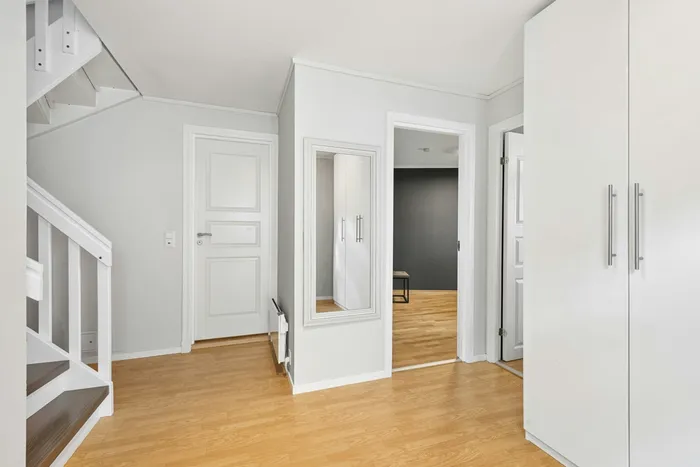
Before
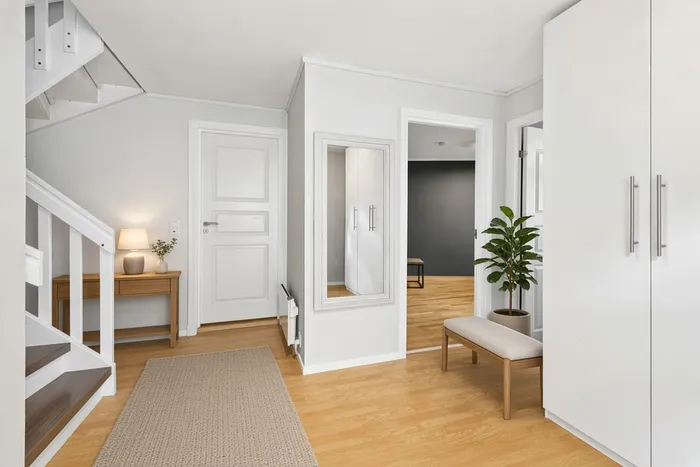
After: our ai-assisted virtual staging edit
This demo was staged with AI assistance and checked by us: only movable furniture was added. Walls, doors and floor are unchanged. On a real listing, the photo would carry a "Virtually staged" label.
The disclosure rules
- California: AB 723 has required disclosure of digitally altered listing images, with access to the original, since 1 January 2026. CRMLS's FAQ asks for a label and the unaltered photo immediately before or after.
- MLS Now: its photo rules allow staging of movable items only, with an on-image label.
- Everywhere: never change permanent features, and never hide defects. More in our guide Is virtual staging legal, and is it worth it? and AI listing photo disclosure.
Hidden costs to check before you order
- Revisions. Some services include one or two free revisions; others charge for each change. Changing the furniture style after delivery can cost as much as the original image.
- Item removal. Staging an empty room is the base price. Removing existing furniture first is often charged separately.
- Rush delivery. Same-day or 12-hour delivery may cost extra.
- Bulk minimums. Low per-photo prices sometimes need a package of several photos.
- Unstaged versions. You'll usually need to publish the original too; make sure you receive it alongside the staged image.
- Exterior or renovation renders. Changing floors, walls or the garden is a different product, priced higher, and usually needs to be shown as a rendering, not a photo.
How many rooms should you stage?
Staging every room rarely makes sense. A practical approach is to stage the rooms that buyers find hardest to imagine when empty, and to leave the rest as clean, well-lit photos.
| Room | Stage? | Reason |
|---|---|---|
| Main living area | Usually yes | The most-viewed room; empty living rooms are hard to judge for size |
| Main bedroom | Often | Shows that a bed and storage fit |
| Awkward or multi-use room | Yes | Shows a use, such as a home office or nursery |
| Kitchen | Rarely | Fixed fittings sell it; a few props add little |
| Bathrooms | No | Staging doesn't change how they read |
| Small spare bedrooms | Sometimes | Only if a buyer might doubt a bed fits |
Working out the real cost: three examples
These use the published price ranges above as illustration; actual quotes depend on the provider and package.
- Small condo, 2 rooms staged with a designer service at about $24–35 each: roughly $48–70 for the staging, plus whatever you spend on basic photo editing.
- Family house, 4 rooms staged with a designer service: roughly $96–140.
- Same house with a self-serve AI tool: the per-image cost can be a few dollars or less, but add your own time to generate, choose, check for errors and re-run images.
Compare those against your own time and the listing's price point. For a lower-priced listing, two well-chosen rooms may be enough.
Common AI staging mistakes to check for
- Furniture that's the wrong scale for the room, making it look bigger than it is.
- Objects blocking or covering windows, vents, radiators or sockets.
- Changed floors, walls, light fittings or window views. These alter the property and aren't staging.
- Impossible details: rugs merging into floors, chair legs missing, distorted lamps.
- Inconsistent styles from room to room.
- Missing "virtually staged" label on the image.
Checklist before you publish staged photos
- The room's permanent features are unchanged.
- Furniture fits the real dimensions.
- The image is labelled as virtually staged, as your MLS or portal requires.
- The unstaged original is included where required.
- Your listing description doesn't suggest furniture is included.
- Staging style suits the likely buyer.
For the rules in more depth, see Is virtual staging legal, and is it worth it? and AI listing photos: what realtors must disclose.
How to brief a staging service
- Send the best empty-room photo, already colour- and exposure-corrected. Staging a dark or tilted photo just produces a dark, tilted staged photo.
- Give room dimensions or note a reference object, such as a standard door, so furniture is scaled correctly.
- Say what the room is for: living room, main bedroom, home office.
- Choose a style that suits the likely buyer, for example modern neutral for a city apartment, warm and family-friendly for a suburban house.
- List what must stay visible: fireplace, built-in storage, windows, radiators, floor finish.
- Ask for the unstaged original to be returned alongside the staged version.
Is virtual staging worth it for your listing?
There's no reliable universal figure for how much staging changes sale prices, and you should be cautious of any claim that says otherwise. A practical way to decide:
- Worth considering when rooms are empty and their use or scale is unclear, when the home is competing with staged listings nearby, or when physical staging isn't affordable.
- Probably not needed when the home is furnished and photographs well after decluttering, or when the buyer pool cares mostly about land or renovation potential.
- Use physical staging instead if you can afford it and buyers will view in person soon; it helps at viewings, where virtual staging can't.
Whichever you choose, the photos need clean editing underneath it. That's often the cheaper improvement.
Our approach
We offer AI-assisted staging, checked by a person and always labelled, alongside the edits most listings need anyway: colour correction, sky, twilight and declutter. Standard listing edits are US$29 for your first listing, then US$45 per listing or US$229 a month, delivered within 24 hours, and you pay after delivery. Ask for a staging quote with your photos on the listing photos page.
Frequently asked questions
How much does virtual staging cost per photo?
From the public pricing pages we checked in October 2026, designer (human) staging runs roughly US$16 to $35 a photo, and AI tools from well under $1 to about $3 a photo on their cheapest plans if you use the whole allowance. Prices change often, so check the vendor's own page.
Is AI virtual staging good enough?
It can be, for simple rooms with clear floors. It's weaker with unusual layouts, odd angles and rooms where furniture must fit real dimensions. Whatever the tool, check that walls, windows, floors and fixtures haven't been changed.
Do I have to label virtually staged photos?
In most MLS rules we've read, yes. CRMLS requires a label such as 'Virtually Staged' and the original photo next to it; MLS Now requires an on-image label. California's AB 723 has required disclosure since 1 January 2026. Check your own MLS and portal.
Do you offer virtual staging?
Yes, as AI-assisted staging checked by us, always labelled. Ask for a quote with your listing; standard listing edits are US$29 for your first listing, then US$45 per listing or US$229 a month.
Related
- Real estate listing photo editing
- Day to dusk photo editing: free tools, DIY and paid services compared
- How to declutter real estate photos: before the shoot and in editing
- Can you edit grass and landscaping in listing photos? What's allowed in 2026
- HDR vs flambient real estate photos: what agents should know (and ask for)
- How to make listing photos look better: 12 fixes, in the order that matters
- Is virtual staging legal, and is it worth it? A realtor's guide
This article is general information, not legal advice. Rules change; check the linked official sources.