Blog · 10 Nov 2026 · 13 min read
Rightmove and Zoopla photo rules for UK estate agents (2026)
On Rightmove and Zoopla, buyers meet your photos in search results and property alerts before they open the full listing, let alone book a viewing. Both portals publish rules on what those photos may contain, and since January 2026 Rightmove's rules spell out exactly how AI edits, CGI and object removal must be handled. This guide is for UK estate and letting agents and the photographers and editors they brief. It covers what each portal's own documents say, how that fits with the National Trading Standards material information guidance, and a shoot and edit brief you can use on your next instruction.
We're the Light & Polish team. We edit listing photos for agents, including in the UK. We are not lawyers, and portal contracts differ by membership type, so check your own contract, your feed provider's documentation and your redress scheme before relying on anything here. For the wider legal background on editing (the Property Ombudsman Code, the Primary Authority advice on photographs and the DMCC Act 2024), see our earlier guide, editing property photos in the UK. This post is the portal-side companion to it.
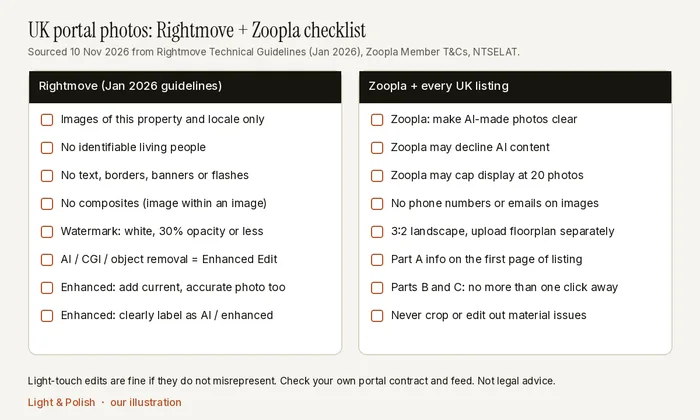
Rightmove: what the January 2026 guidelines say about photos
The Rightmove Agent and Developer Technical Guidelines (dated January 2026 on the PDF we downloaded) are the document Rightmove points members to. Paragraph 10 covers the image carousel. When you upload images, you warrant that:
- they show only the property or land being offered and its immediate locale (rental operator and commercial members may also show occupier lifestyle), and are in no way misleading;
- you have all the permissions needed, including copyright;
- no living person can be identified in them (again, rental operator and commercial members are treated differently);
- any third-party intellectual property, such as a brand on a poster, is blurred so it can't be identified.
Paragraph 29, the data quality table, adds the presentation rules. Images must not contain text, with one exception: where the location of the property or a relevant feature is unclear (Rightmove gives a drone shot as the example), you may mark it with an arrow or outline. Borders, banners and corner flashes are listed as misuse, as are composite images (an image within an image) and logos or other images that aren't relevant to the property. Watermarks are allowed only if they are white on photos or greyscale on floorplans, translucent at 30% opacity or lower, no larger than a quarter of the image, and used only to protect copyright with no further messaging.
In practice that rules out the "Reduced", "New instruction" or "Viewings this Saturday" overlays some agents still burn into the lead photo. The portal shows its own status flags; your image should just be the property.
Light Touch Edits vs Enhanced Edits
This is the part of the January 2026 guidelines that matters most for anyone who edits photos. Rightmove defines two categories:
- Light Touch Edits: "minimal editing such as cropping, brightness/contrast adjustments, colour balance, shadow lifting and warming tones."
- Enhanced Edits: content that is "(i) generated and/or manipulated by AI; (ii) CGI; or (iii) manipulated or modified manually, such as adding or removing objects, or making enhancements e.g. changing architectural features."
Both are permitted, provided they "do not misrepresent the property". Because Enhanced Edits "may be perceived as authentic by a consumer", any Enhanced Edit you upload must be:
- accompanied by current, accurate images of the room and/or property; and
- clearly labelled as being AI or otherwise enhanced.
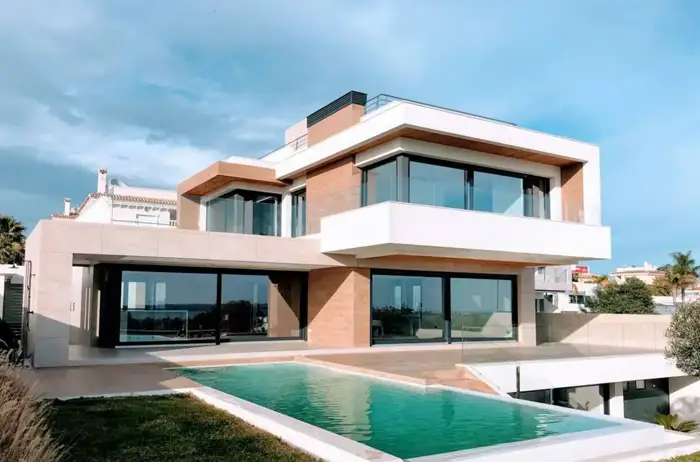
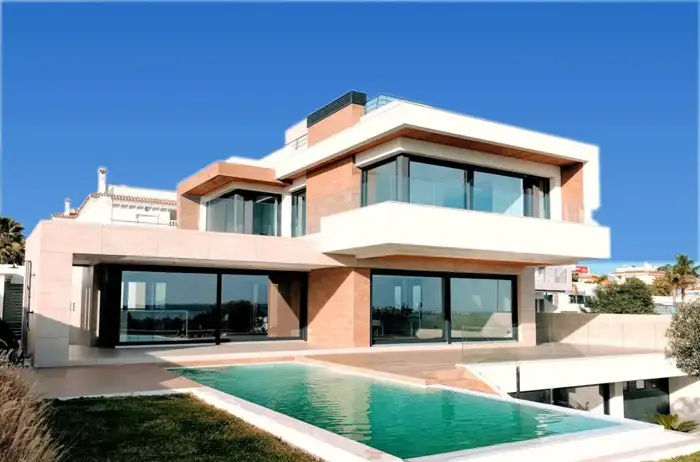
Rightmove reserves the right to remove content it reasonably believes does not comply. Read literally, the definition is wide. An AI sky replacement, a virtual twilight, virtual staging, removing a wheelie bin or a parked car, and any CGI of a new build all fall under "Enhanced". Exposure, white balance and a crop do not. The guidelines don't say where the label must go. The safest reading, in our view, is to put it in the photo caption (both Rightmove's upload screen and ZooplaPro have a caption field per photo) and, if you like, in the description too, and to keep the original photo of the same room in the gallery. Don't burn the label into the image itself for Rightmove: paragraph 29 says images must not contain text, so a caption does the job without breaking that rule.
Rightmove sizes, order and floorplans
The technical guidelines don't set pixel sizes. Rightmove's support pages do. Its customer FAQ on uploaded property images says:
- upload in a 3:2 ratio so images fill the space on mobile and desktop;
- search results show images at 224 x 149 pixels and the main gallery at 656 x 437;
- Rightmove accepts images up to 1024 pixels in width or height, so a landscape image shows at up to 1024 x 683, and larger files get an "enlarge" link;
- there's no limit on the number of images, but your data feed or software may set one, and many feeds cap files at 20MB per image.
Rightmove's Create the Ultimate Sales Listing guide (a 2020 PDF on Rightmove Hub) recommends uploading at least five photos, leading with your best one, shooting exteriors on a clear day, keeping interiors clutter-free and uploading at 1024 x 683 pixels minimum. It also says floorplans should go in the floorplans section (so the floorplan icon shows in alerts and search results), with room dimensions, one plan per floor, and between 600 and 2025 pixels. Rightmove's newer commercial listing guide (January 2026) makes the same point about floorplans: if you upload one as an ordinary image, it won't appear in the floorplan slot and the listing won't show that it has a floorplan in search results. The same guide notes that only your first photo shows in property alerts.
Rightmove's property administration guide for estate agents shows an exclamation mark in Rightmove Plus when a listing has too few pictures or no floorplan, and lists "5 or more photos, all photos at least 656 x 437 pixels, floorplan" under the media part of its listing quality check. It also says that this check is guidance, and a property can go live without full marks.
Zoopla: what the member terms and support pages say
Zoopla's rules sit mostly in its Member Terms and Conditions (the version we read is marked "Updated: 1 December 2025"). Clause 5.1(a) requires all content to be accurate, transparent, up to date and not misleading. Clause 5.1(c) sets the Photograph Content Criteria. Photos must:
- be of good quality;
- show only the member's profile photograph or images related to the relevant property, and "where the Photographic Content is produced using autonomous technology (fully or partial), machine learning or other analogous technologies the Member will make this clear";
- not contain telephone numbers or email addresses other than Zoopla contact details;
- not contain any personal data;
- not contain any promotion of the member, or adverts for other products or services.
Clause 5.1(d) says Zoopla may decline to upload AI-produced content where the law requires it or to protect the integrity of its websites, and clause 5.2(i) says Zoopla may limit the number of photographs displayed to 20 per property. So if your Rightmove gallery has 30 images, decide which 20 matter most and order them that way, rather than letting the feed decide for you.
Zoopla's member support article on adding photos to your listings (last updated 4 October 2024) gives the technical side: JPG, GIF, BMP or PNG files; an optimum landscape size of 1024 x 768 and a minimum of 645 x 430 (portrait 768 x 1024); a 5MB maximum; and a 3:2 aspect ratio. Each photo has a caption field, which is where a "virtually staged" or "AI-enhanced" label can go. Changes go live on Zoopla within the hour.
The two portals' numbers don't match exactly (1024 x 683 on Rightmove, 1024 x 768 optimum on Zoopla, both asking for 3:2). In our experience the simplest approach is to export one 3:2 landscape master, larger than both portals' display sizes, and let your CRM feed resize it.
OnTheMarket
OnTheMarket's public agent's guide to a great listing recommends a high-quality lead image (landscape over portrait), a minimum of five internal and external images together with a floor plan, and images that are correctly sized and not blurry. We didn't find a public OnTheMarket document on AI edits or watermarks when we checked on 10 November 2026, so follow your member contract and, where you list on all three portals, the stricter Rightmove rule is a sensible default.
Where material information fits
Portal rules sit on top of consumer protection law, not instead of it. National Trading Standards' Estate and Letting Agency Team (NTSELAT) published its full material information guidance in November 2023, developed with Rightmove, Zoopla, OnTheMarket and PropertyPal. Part A (price, tenure and council tax band or rate for sales) applies to all listings. Part B (property type, construction, number and type of rooms, utilities, broadband, mobile signal and parking) should be established for all properties. Part C (for example building safety, restrictions, rights and easements, flood risk, planning and accessibility) applies where the property is affected.
The sales guidance (version 1.0) says Part A should be on the first page of a listing and that, online, Parts B and C should be no more than one click away. It also says EPC ratings should be included on a listing unless exempt. Two lines in it speak directly to photos:
- On construction materials: a listing should let consumers understand the general material makeup of the property, "which may be achieved through comprehensive photography (e.g., all aspects, elevations, internal and external rooms). However, photography should not be used to avoid disclosing detail of materials used that will knowingly impact a buyer."
- On accessibility and outside space: it recommends photographs looking outward to any private outside amenity or garden, and a photograph looking back into the property.
The original guidance PDF link on the National Trading Standards site now redirects to its material information page (checked 10 November 2026); the quotes above are from version 1.0 as published in November 2023. In plain terms: a thatched roof, a flat-roof extension, timber-framed windows or a substation at the end of the garden should be visible in the set, not cropped out or edited away. The Advertising Standards Authority makes the same point for all ads: in its September 2025 note "A picture says a thousand words" it says images that exaggerate the quality or size of what the consumer will get are likely to mislead, and that post-production should not exaggerate either.
A shoot list for UK portal galleries
These are our suggestions as editors, built around the portal and NTSELAT points above. They are not portal rules.
- Lead image first. Rightmove's guides say only your first photo shows in property alerts (and, per its 2020 sales guide, in mobile search results), so choose a strong, honest front elevation or the best room, shot landscape.
- Every elevation that matters. Front, rear and any side with an extension, conversion or unusual material. That covers NTSELAT's "comprehensive photography" point.
- Each room once, in the order of a viewing. Hall, reception rooms, kitchen, bedrooms, bathrooms, then any utility, loft or cellar. Add a second angle only if it shows something new.
- Garden both ways. One shot from the house out to the garden, one from the garden back to the house.
- Parking and access. Driveway, garage or on-street parking, and the approach to the front door if you'll describe it as step-free.
- Nobody in shot. Clear vendors, tenants, children and pets out of frame, and turn family photos face down. Rightmove bars identifiable living people for most members, and Zoopla bars personal data.
- Standard lens where you can. If a small room needs a very wide lens, say so in the caption, as the Primary Authority advice on photographs suggests (covered in our UK editing rules post).
- Plans and EPC separately. Upload the floorplan to the floorplan slot with room dimensions, and the EPC where your system asks for it, not as gallery images. For room sizes and plan accuracy, see our UK floor plans and room sizes guide.
Which edits fit which category
| Edit | Rightmove category (our reading) | What to do |
|---|---|---|
| Exposure, contrast, white balance, crop, straighten verticals | Light Touch | No label needed, as long as the result doesn't misrepresent the room |
| Window pull (recovering a view that was in the frame) | Light Touch in most cases | Keep the real view; never swap in a different one |
| Sky replacement | Enhanced if done with AI or by adding a new sky | Caption it and keep the original exterior in the set |
| Virtual twilight | Enhanced | Caption it, for example "Digitally enhanced dusk image", and include the daytime shot |
| Removing bins, cars, cables or clutter | Enhanced (removing objects) | Caption it, keep an unedited view of the same room, and never remove fixed features |
| Virtual staging | Enhanced | Furniture only; caption "Virtually staged"; include the empty room photo |
| Removing damp, cracks, pylons, a neighbouring building | Misrepresentation | Don't. We refuse these edits |
| Logo, price banner or phone number on the image | Misuse of media (Rightmove), not allowed (Zoopla) | Leave it off; use a compliant watermark if you need one |
Treating object removal as an Enhanced Edit is a cautious reading of Rightmove's definition, which includes "adding or removing objects". If your Rightmove account manager tells you otherwise for minor tidying, keep a note of that advice with the listing.
Common photo mistakes on UK portals (our view)
- Banners and text on the lead photo. Rightmove lists them as misuse of media.
- A staged or twilight image with no original beside it. Rightmove now requires current, accurate images to accompany Enhanced Edits.
- No label on AI edits. Both Rightmove and Zoopla ask you to make it clear.
- Floorplan uploaded as a photo. It won't show in the floorplan slot on Rightmove.
- Portrait phone shots. Both portals ask for 3:2 so images fill the space; a portrait shot won't.
- Thirty photos sent to Zoopla unsorted. Zoopla may display only 20, so order the set yourself.
- Cropping out the awkward bit. A flat roof or a building site next door that's left out of every photo tends to come out at the viewing, and NTSELAT warns against using photos to avoid disclosure.
A brief you can send your photographer or editor
- 3:2 landscape JPEGs, larger than 1024 pixels on the long edge; floorplans as separate files with room dimensions.
- Lead image: best honest front elevation or main room. Then rooms in viewing order, every relevant elevation, and the garden both ways.
- No people, family photos, documents or third-party branding in shot; blur anything that can't be moved.
- Light Touch edits only by default: exposure, colour balance, contrast, crop, verticals.
- Sky, twilight, staging or object removal only when asked, each delivered with the untouched original and a suggested caption.
- No text, banners, borders, composites or phone numbers on any image. Any watermark white, 30% opacity or less, no more than a quarter of the frame.
- Never remove fixed features, damage, construction details or neighbouring buildings.
What it costs to have us edit the set
As published on our pricing and listing photos pages: first listing US$29, then US$32 per listing, or US$229 a month for regular listings. Edits are delivered within 24 hours, and you pay after delivery. You keep your originals, so the untouched frame can stay in the gallery beside each enhanced one. If you'd like to judge the style first, send one listing photo to hello@lightandpolish.com or use the contact form and we'll edit it free. More on our UK service is on the UK real estate photo editing page.
Related reading: sky replacement, AI listing photos and disclosure, editing for Australian and UK agencies, and our guides for Canada and Dubai.
Frequently asked questions
Is virtual staging allowed on Rightmove?
Yes, with conditions. Rightmove's Agent and Developer Technical Guidelines (January 2026, paragraph 10) class AI, CGI and manual object adding or removal as Enhanced Edits. They are permitted if they do not misrepresent the property, but they must be accompanied by current, accurate images of the room or property and be clearly labelled as AI or otherwise enhanced. Rightmove can remove content it believes does not comply.
Does Zoopla require AI-edited photos to be labelled?
Zoopla's Member Terms and Conditions (updated 1 December 2025, clause 5.1(c)) say that where photograph content is produced fully or partly using autonomous technology, machine learning or similar technology, the member will make this clear. Clause 5.1(d) says Zoopla may decline to upload such content where the law requires it or to protect the integrity of its websites.
What size should UK portal photos be?
Rightmove's customer FAQ asks for a 3:2 ratio and says it displays landscape images at up to 1024 x 683 pixels, with results thumbnails at 224 x 149 and the main gallery at 656 x 437. Zoopla's member support page (last updated 4 October 2024) gives 1024 x 768 as the optimum landscape size, 645 x 430 as the minimum, a 3:2 ratio and a 5MB limit. Your CRM or feed may add its own limits.
Can I put our logo or a 'Reduced' banner on Rightmove photos?
Rightmove's guidelines list text in images, borders, banners and corner flashes as misuse of media. A watermark is allowed only if it is white (greyscale on floorplans), translucent, no more than 30% opacity and no larger than a quarter of the image, and used only to protect copyright with no further messaging.
Our services: Real estate photo editing (first listing US$29) · Real estate photo editing uk · Free listing photo checklist (PDF)
Related
- Real estate listing photo editing
- Quebec listing photos: OACIQ AI label, French text and sold banners (2026)
- How much does drone photo editing cost for real estate? (2026 prices)
- How much does 360° virtual tour editing cost? (2026 prices)
- Dubai holiday home listing photos: DET permit and platform rules (2026)
- How much does real estate video editing cost? (2026 prices)
- Drone listing photos in Australia: CASA rules for agents (2026)
This article is general information, not legal advice. Rules change; check the linked official sources.