Blog · 07 Nov 2026 · 12 min read
How to shoot MLS and REALTOR.ca listing photos in Canada
If you list homes in Canada, buyers usually meet your photos on REALTOR.ca and on your local board's MLS® System long before they book a showing. This guide is for Canadian REALTORS® and licensed agents (and the photographers you brief). It covers how REALTOR.ca relates to board MLS feeds, which accuracy duties sit in the CREA REALTOR® Code, concrete image rules we could verify from PropTx and RECO in Ontario and from BCFSA in British Columbia, which edits stay fair, and mistakes that waste enquiries. We're the Light & Polish team — we edit listing photos for agents, including in Canada. We are not lawyers. Rules differ by board and province and change; check the live MLS rulebook, your provincial regulator and your brokerage's compliance lead before you publish.
For the edit types we offer (virtual twilight, sky replacement, declutter, staging, exposure and verticals), see our Canada real estate photo editing page and the main listing photos page. This post is the shoot-and-upload brief, not a sales page. For a wider disclosure habit outside Canada, see AI listing photos and disclosure; for US board examples see Bright / CRMLS photo rules; for the UK and Australia frame see UK property photo editing rules and Australia / UK editing notes.
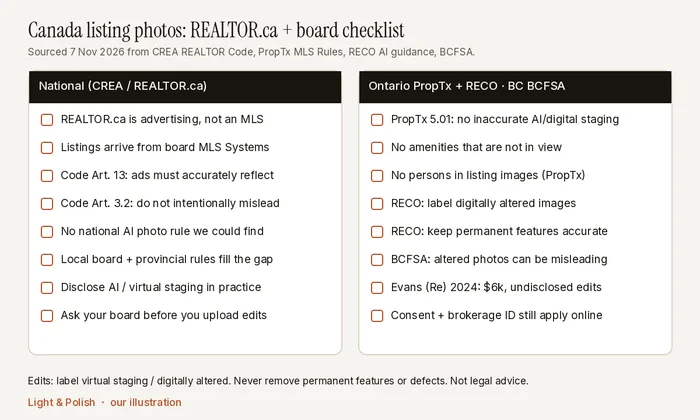
REALTOR.ca shows what your board MLS sends
REALTOR.ca is Canada's national listing advertising site. CREA's own explainer on realtor.ca/mls states that REALTOR.ca is not an MLS® System. MLS® Systems are the cooperative selling systems run by local boards and associations; REALTOR.ca is an advertising website that displays residential and commercial listings from REALTORS® across the country, and its listing content comes from those board systems.
CREA Café's guide to real estate tech acronyms (read 7 November 2026) puts the pipeline in one sentence: MLS® Systems operated by boards and associations send their listings to REALTOR.ca — the national listing marketing website and mobile apps owned and operated by CREA — up to four times daily. In practice, that means the photo set you upload to your board is the set buyers see on REALTOR.ca (after each platform's own resizing and cropping). We did not find a separate public REALTOR.ca pixel checklist that replaces board rules. Treat board upload specs and board image rules as binding; treat REALTOR.ca as the national shop window for that same feed.
CREA Café also notes that permission to advertise a listing on the web is usually a setting in your MLS® System (language similar to “Advertise listing on the Web”). Confirm that switch with your brokerage before you assume a gallery is live nationally.
CREA REALTOR® Code: accuracy, not a pixel manual
The REALTOR® Code (PDF linked from realtor.ca; © 2011–2023 on the file we downloaded) does not name virtual staging, sky replacement or AI edits. Two articles still matter for every photo you publish:
- Article 13 (Advertising – Content/Accuracy): “All Advertising and promotion of properties shall accurately reflect property and other details and prominently display the name of the brokerage and any additional information required by provincial regulation.” Interpretation 13.2 says a REALTOR®'s internet website is an advertising vehicle, and that on a multi-page site every page is an advertising vehicle — all properties displayed and all representations must comply with the Code and applicable advertising law.
- Article 3.2: a REALTOR® “shall not intentionally mislead anyone as to any matters pertaining to a property.”
Real Estate Magazine (30 March 2026) reported that CREA told REM these Code provisions “may be engaged” by misuse of AI, that the Code does not address AI directly, and that CREA does not monitor how members use AI — pointing instead to provincial regulators and local MLS rules. That matches what we found: national ethics language is accuracy-first; the operational photo rules live at board and province level.
CREA Café's May 2025 piece on AI home staging quotes practising REALTORS® who urge disclosure so buyers are not surprised on showing day, warn against overstaging that exaggerates finishes or space, and remind readers to follow local board photograph rules. That Café article is industry commentary, not a CREA by-law — useful as culture, not as your compliance checklist.
Ontario: PropTx MLS® Rules and RECO on altered images
Many Greater Toronto and other Ontario boards load listings through PropTx. The public PropTx MLS® Rules PDF (downloaded 7 November 2026) is specific about images in Article 5 – Advertising:
- 5.01 — every image must prominently feature the listed real estate itself and aspects of the immediate surroundings that relate directly to it (including scenery viewed from the property).
- Images that cannot be included:
- Digitally altered images including the use of any artificial intelligence (“AI”) system or technology to create, alter, or enhance images or digital staging that do not accurately depict the listed real estate;
- Images of surrounding amenities that are not in view of the listed real estate;
- Images of advertising or marketing messages, except labelled architectural drawings, floor plans, maps, aerial or distance photographs relating to the listed real estate;
- Any persons or digital representations of persons.
- 5.05 — by submitting Marketing Materials you warrant you have permission to use them; use only materials you created or purchased, with written consent where needed.
PropTx listing rules also treat a listing as incomplete if it is not accompanied by at least one image of the listed real estate (with limited exemptions, such as unbuilt product using a labelled model, rendering, map or land photo — read Art. 3 in the current PDF for the exact exemption wording).
The Real Estate Council of Ontario has published explicit AI guidance. RECO Guidance – Use of Artificial Intelligence (page dated 22 October 2026) tells registrants to:
- Independently verify AI-generated content, including listing details, against property documents and physical facts before publishing;
- Be transparent about altered images: “Virtual staging and other AI-modified images must accurately reflect the property’s permanent features and be clearly labelled as digitally altered.”
- Keep confidential client data out of public AI tools;
- Keep professional judgement human;
- Encourage brokerages to set internal AI policies and training.
RECO Bulletin 5.3 (Advertising online) repeats the broader TRESA advertising frame: identify the agent and brokerage clearly; keep information current, clear and accurate; obtain consent before advertising property-identifying photos or selling prices; avoid false, misleading or deceptive information; remove photos and video when written consent ends. Bulletin text is for convenience and is not legal advice — RECO says so on the page.
Real Estate Magazine's March 2026 enforcement feature also quotes TRREB CEO John DiMichele: limited adjustments such as colour correction, brightness, contrast enhancement and virtual staging are permissible provided they do not materially alter the factual accuracy of the image or misrepresent any feature, condition or view. Treat that as a board-leadership statement reported in the trade press; PropTx Art. 5.01 and RECO's label-and-permanent-features test are the primary public texts we could download.
British Columbia: BCFSA treats undisclosed alteration as misleading
BCFSA's Consumer Guide to Advertising tells sellers that advertising must be truthful and cannot be misleading, and lists digitally altered or enhanced photos (and untrue claims about size or contents) among examples of false or misleading advertising.
That is not theoretical. In Evans (Re), 2024 BCSRE 59 (reasons dated 4 September 2024, File No. 23-4754), BCFSA confirmed a $6,000 administrative penalty. The hearing officer found that MLS photographs had been digitally altered — furnishings that did not match the property as shown on a later visit, and condition issues such as peeled and cracked paint that were not apparent in the listing set — and that the respondent had failed to disclose the digital modification. Breaches found: Real Estate Services Rules 34 (reasonable care and skill) and 41 (publishing advertising containing a false or misleading statement or misrepresentation concerning real estate). The decision is worth reading in full before you brief an editor in B.C.
Other boards: CREB-style disclosure (secondary source)
We could not download a current public CREB MLS rulebook PDF on 7 November 2026. Real Estate Magazine's March 2026 feature reports CREB practice as: virtually enhanced photos that misrepresent a property in a way that would affect its value are prohibited on the MLS® System; virtual staging with realistically sized, unattached furniture is permitted but must be disclosed in the public remarks; enforcement follows an inform-then-escalate path. Until you hold the CREB (or your own board) PDF, treat that as trade-press reporting and confirm with your member practice desk. The same article stresses that national CREA / REALTOR.ca layers do not replace board rules — which matches CREA Café and the realtor.ca/mls explainer.
How to shoot for Canadian board + REALTOR.ca galleries
These shooting tips are our view as editors, not board rules. They sit on top of the accuracy tests above.
- Shoot the listed unit, not a neighbour's view of amenities. PropTx 5.01 bars amenity photos that are not in view from the listed real estate. If the condo gym is not visible from the unit, don't sell it as a “view from home” frame.
- Daylight first; level the camera. Soft morning or late-afternoon light keeps window views readable in Canadian winters; we can even exposure later, but we cannot invent a lake or skyline that was never in the frame.
- Leave crop room. REALTOR.ca and board apps re-crop for cards and mobile. Don't put the only readable room label or a disclosure caption at the extreme edge.
- One clear shot per room, then a second angle if it adds information. Cover kitchen, baths, bedrooms, living, mechanical where material, and honest exterior and street context.
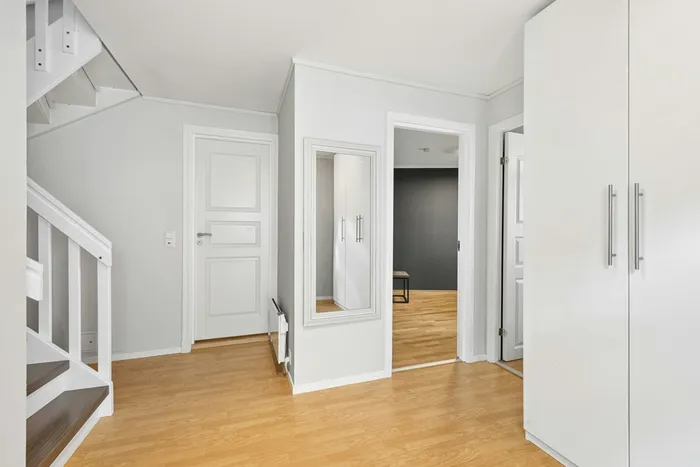
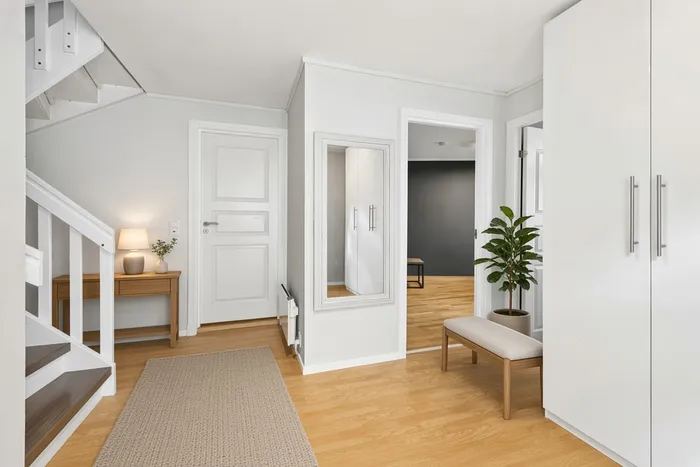
- Empty or tenanted? If you will virtually stage later, also capture a clean empty (or as-is) set so you can publish the original beside the staged frame — the habit CREA Café interviewees and trainers describe, and the transparency RECO asks for.
- No people in PropTx uploads. Art. 5.01(d) bans persons or digital representations of persons in MLS images. Clear the frame before you shoot.
- Rights. PropTx 5.05 and RECO Bulletin 5.3 both care about permission. Use photos you created or purchased, and keep seller/photographer consent current.
Which edits stay fair (and what we refuse)
The safe national test, in our view, is the Code's accuracy duty plus your board's altered-image rule: would a buyer standing in the unit recognise the photo, and does any edit hide something material? Provincial guidance tightens that for Ontario (label + permanent features) and B.C. (undisclosed alteration has already drawn a published penalty).
| Edit | Generally fine (our view) | Risky / we won't do |
|---|---|---|
| Exposure, white balance, straighten verticals | Yes | — |
| Remove movable clutter (cables, bins, personal items) | Yes | Removing damage, damp, peeling paint or missing fixtures |
| Sky replacement | Usually, if light and season still look realistic | Hiding a fixed skyline or view feature that affects the property |
| Virtual twilight | Yes, labelled as digitally edited / virtual twilight | Unlabelled dusk that implies a night shoot of a different unit |
| Virtual staging | Movable furniture only; labelled “Virtually staged” / “Digitally altered”; original empty frame kept where required | Changing walls, windows, floors, room size, or adding amenities the unit does not have |
| Window view pull | Recover detail that was in the frame | Replacing the actual view with another location |
| Amenity stock from the building brochure | Only if your board allows labelled marketing extras — PropTx limits amenity shots that are not in view | Presenting off-site amenities as the view from this listing |
We label AI-assisted sample work on our site. On your listing, follow RECO / BCFSA / your board practice; we can burn a “virtually staged” or “digitally altered” caption into the file on request. For whether staging is worth it commercially (not a Canada legal brief), see Is virtual staging legal / worth it?.
Common photo mistakes that hurt Canadian enquiries (our view)
These are patterns we see as editors. They are not a national rejection list:
- Assuming REALTOR.ca has a separate, looser photo policy. It displays what your board sends.
- Unlabelled virtual staging. RECO asks for clear digitally-altered labels; BCFSA has already penalised undisclosed modification; several boards require remarks disclosure.
- Editing out condition. Peeling paint, water stains and missing appliances are exactly the class of change that sank the B.C. case.
- Amenity tourism. Gym, rooftop and lobby shots that are not in view from the unit can breach PropTx-style rules.
- People in the frame on PropTx uploads. Art. 5.01(d) is blunt.
- Show-suite photos sold as the actual unit. Accuracy duties in the Code and PropTx's “accurately depict the listed real estate” test both cut against that.
- Heavy HDR halos and crooked verticals. They look amateur next to a clean competing listing — our view, not a scored metric we can cite.
A brief you can send your photographer or editor
- JPEG of the listed unit and in-view surroundings only; no people in PropTx-bound sets.
- Daylight exteriors and interiors; level camera; keep window views honest.
- Cover every room once; add a second angle only when it adds information.
- If staging later, also deliver a clean as-is / empty set for side-by-side disclosure.
- Standard corrections only unless asked: exposure, white balance, verticals, window pull.
- Sky / twilight / staging only where requested; burn “Virtually staged” or “Digitally altered” into those files.
- Do not remove permanent features, damage, neighbouring buildings or out-of-view amenities presented as on-site views.
- Confirm board public-remarks wording (CREB-style disclosure where required) and provincial label rules before go-live.
Listing in Quebec? Our guide to Quebec listing photos and OACIQ rules covers the AI-image statement, keeping originals, photo copyright, "sold" banners and French text on graphics.
What it costs to have us edit the set
Published on our pricing and listing photos pages: first listing US$29 (about CA$35), then US$32 (about CA$39) per listing, or US$229 (about CA$275) a month for regular listings. Delivered within 24 hours. You pay after delivery. One free sample edit if you want to judge the style first — email one listing photo to hello@lightandpolish.com or use the contact form.
Booking aerials as well? Our guide to drone listing photos and Transport Canada rules covers drone weight, pilot certificates and airspace checks.
Related reading: virtual twilight, sky replacement, Dubai Bayut / Property Finder guide, and our Canada service page.
Frequently asked questions
Does REALTOR.ca set its own photo upload rules?
No national REALTOR.ca pixel checklist for listing photos turned up in our 7 November 2026 review. REALTOR.ca is CREA's national advertising site; listing photos come from your local board's MLS® System (boards send listings to REALTOR.ca up to four times daily, per CREA Café). The binding image rules are your board's MLS rules plus provincial advertising law.
Can I use virtual staging on a Canadian MLS listing?
It depends on your board and province. PropTx MLS® Rules Art. 5.01 bar digitally altered images and digital staging that do not accurately depict the listed real estate. RECO's 22 October 2026 AI guidance says virtual staging and other AI-modified images must accurately reflect permanent features and be clearly labelled as digitally altered. CREB practice reported in Real Estate Magazine requires public-remarks disclosure for virtually staged images. Always read your own board rulebook.
Do I have to label digitally altered photos in Ontario?
RECO's Guidance – Use of Artificial Intelligence (page dated 22 October 2026) says registrants must clearly label digitally altered images and keep permanent features accurate. RECO Bulletin 5.3 also requires online advertising to be current, clear and accurate and not false, misleading or deceptive. We're not lawyers — follow TRESA, your brokerage policy and PropTx or other board rules.
What happened in the B.C. digitally altered photo case?
In Evans (Re), 2024 BCSRE 59, BCFSA confirmed a $6,000 administrative penalty where MLS photos had been digitally modified (furnishings and apparent condition, including peeled paint not visible in the listing set) without disclosure. The hearing officer found breaches of Real Estate Services Rules 34 (care and skill) and 41 (false or misleading advertising). BCFSA's consumer advertising guide lists digitally altered or enhanced photos as an example of false or misleading advertising.
Our services: Real estate photo editing (first listing US$29) · Real estate photo editing canada · Free listing photo checklist (PDF)
Related
- Real estate listing photo editing
- Quebec listing photos: OACIQ AI label, French text and sold banners (2026)
- How much does drone photo editing cost for real estate? (2026 prices)
- How much does 360° virtual tour editing cost? (2026 prices)
- Dubai holiday home listing photos: DET permit and platform rules (2026)
- How much does real estate video editing cost? (2026 prices)
- Drone listing photos in Australia: CASA rules for agents (2026)
This article is general information, not legal advice. Rules change; check the linked official sources.