Blog · 12 Nov 2026 · 14 min read
realestate.com.au and Domain photo rules for Australian agents (2026)
Australia's two big property portals, realestate.com.au and Domain, both publish rules on what listing photos may contain, and three state regulators (NSW Fair Trading, Queensland's Office of Fair Trading and Consumer Affairs Victoria) have written down what they consider misleading, including edits made with AI. This guide pulls those documents together for agents, property managers and the photographers and editors they brief, and finishes with a shoot list and an edit brief you can use on your next campaign.
We're the Light & Polish team. We edit listing photos for agents, including in Australia. We are not lawyers, and portal agreements and CRM feeds differ, so check your own agreement, your CRM's documentation and your state regulator before relying on anything here. For the general background on honest editing across markets, see our AI listing photos and disclosure guide. This post is the Australia-specific companion to it.
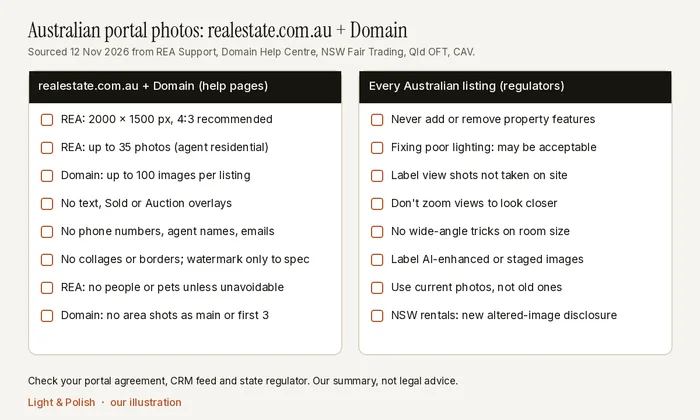
realestate.com.au: what REA Support says
REA's help article on image and video requirements for realestate.com.au listings (updated October 2026 when we read it) sets the technical rules. Images that don't meet them may be rejected:
- recommended resolution 2000 x 1500 pixels, a 4:3 ratio; 3:4, 16:9, 3:1 and 16:10 are also accepted;
- JPEG, PNG or static GIF, up to 20MB per image, RGB colour (CMYK isn't supported), 72 DPI;
- static GIFs only for floorplans, on a white, non-transparent background;
- agents can upload up to 35 photos on a residential listing (private landlords get 20 on a rental listing).
The same article lists what to keep out of listing photos:
- text overlays such as "Sold", "Under Offer" or "Auction";
- contact details such as agent names, phone numbers or email addresses;
- marketing messages or excessive agency branding;
- image collages (only single images are permitted);
- people or pets, unless they are an unavoidable part of the shot.
REA also suggests ordering photos logically: a hero shot of the exterior first, then the main living areas, kitchen, bedrooms and outdoor spaces. Videos must not carry agent or agency branding.
Two practical details sit in other articles. If you upload directly in Agent Admin rather than through your CRM, REA's article on resizing a property photo for Agent Admin says to keep each file under 2.5MB, because larger files can cause errors. And REA's watermark guidelines, which it describes as part of its Acceptable Use Policy, say a watermark must be colourless, transparent so the image shows through, in the bottom right-hand corner, and no larger than 2% of the total image size. (The article is titled for realestate.com.au, though parts of its text refer to realcommercial.com.au.) On a 2000 x 1500 image, 2% of the area is 60,000 pixels, roughly a 245 x 245 pixel square.
One more tip comes from a CRM rather than REA: Box+Dice's help centre notes that images in realestate.com.au search results are cropped, and suggests a 4:3 ratio with key content inside the central 75% of the frame (Box+Dice, image requirements for realestate.com.au). Keep the front door and roofline away from the edges of your hero shot.
Domain: what the Help Centre says
Domain's rules on photos are set out in its Help Centre article on breach listings, images and URLs (dated 26 May 2026). It says that under the Domain Group General Terms and Conditions, images "must be current and unembellished representations of the opportunity", and that:
- images must be of the actual property;
- images may not include any text or corporate message, a logo or a border;
- images may not show a collage or combination of photos within one frame;
- surrounding-area or lifestyle images may not be the main image or any of the first three, and must show the actual location;
- documents such as contracts or inclusions lists may not be uploaded as images.
A watermark is allowed to the specification shown on that page (Domain presents it as an image, so check it there). Videos may carry a transparent agency-logo watermark in one corner, no larger than 10% of the image size. The article also explains that breach listings are removed, the agency gets a warning, and after two warnings an infringement is sent to cover administration costs.
On volume, Domain's article on how many images you can load (15 September 2026) says up to 100. With REA capped at 35 for agents, the simplest approach is one ordered set where the first 35 are the ones that matter, so both portals lead with the same images.
Domain also publishes the editing guidelines its own team follows for photos shot through its Matterport booking service (6 October 2026). They aim for "a realistic, accurate representation of the property as it presents on the day of the shoot". Its editors adjust exposure, colour and white balance, contrast and window brightness, and replace skies so primary front and rear exteriors have clean blue skies. They don't remove bins, leaves or stray items, don't fix scuffs, damage or reflections, and don't do heavy retouching that alters spatial reality. Those are Domain's rules for its own service, not for your photos, but they're a useful sense of where a portal draws the line between light correction and alteration.
What the regulators say about edited photos
Portal rules sit on top of the law, not instead of it. NSW Fair Trading's advertising guidelines for property agents explain the federal base: section 18 of the Australian Consumer Law bans misleading or deceptive conduct in trade or commerce, and section 30 bans false or misleading representations about land, including its location and characteristics.
NSW
The NSW guidelines are the most specific. They say agents must not:
- modify, or allow photographs to be modified, so that the images no longer truthfully and fairly represent the property;
- change the appearance of a property by digitally removing or adding features (adjusting the lighting effects only to compensate for poor lighting may be acceptable);
- zoom in on a photograph of a view from the property to make that view appear closer.
They also give examples of misleading campaigns: a water view placed next to a photo of the house when it can't be seen from the house, and a photo taken so long ago that it no longer shows the property as it is. A photo of a park, beach or café in the immediate area that wasn't taken on the property "should have printed on the photograph 'location shot'". Photos taken on the property need no label.
Since 21 September 2026, the same page says, if photos or videos of a rented property show a tenant's or their dependent child's belongings (including through windows or in outdoor areas), the agent must give the tenant a free copy and get their written consent before publication. That applies to sales campaigns for tenanted properties too.
Queensland
Queensland's Office of Fair Trading published a two-page best practice guide on avoiding misrepresentations that deals directly with AI. It says the OFT has observed a growing trend in digital enhancements and AI-generated content in property marketing, and recommends that agents:
- use AI to improve lighting, colour and clarity, but make sure the final image reflects the property's actual condition;
- clearly indicate when images have been digitally enhanced or virtually staged, for example with a note such as "This image has been digitally enhanced for illustrative purposes."
It asks agents to avoid using AI to remove unattractive features such as powerlines or neighbouring buildings, adding things that don't exist such as trees or pools, using views that aren't real, using wide-angle lenses to distort room sizes, using old photos, and creating windows or landscapes that don't exist. Its case example is a listing with a sparkling blue pool that buyers found green and murky under a torn shade sail. It also warns that agents may be liable even when inaccurate content came from a third party or AI, so check every image yourself before it goes live. The legal basis it cites is the Property Occupations Act 2014 and the Australian Consumer Law.
Victoria
Consumer Affairs Victoria's page on advertising and representations for estate agents says agents should not use photographs that give the wrong impression, including photos "digitally or otherwise enhanced to hide undesirable features or promote other features" and photos accompanied by comments or other photos suggesting views or closeness to amenities. It notes that knowingly concealing a material fact from a potential buyer has been against the law since 1 March 2020, that an offence can occur whether or not you meant to mislead, and that the principal agent or officer in effective control is responsible for the agency's advertising.
Other states and territories
The Australian Consumer Law applies everywhere, but we've only summarised guidance from the three regulators above. If you sell in WA, SA, Tasmania, the ACT or the NT, check your own regulator's advertising guidance.
NSW rentals: a new altered-image disclosure rule
The Residential Tenancies Amendment (Protection of Personal Information) Act 2026 (NSW) was assented to on 2 October 2026 as Act No. 38 of 2026, according to the NSW Parliament bill page. The version passed by both Houses inserts a new section 22B into the Residential Tenancies Act 2010. Subsection (5) says a landlord or landlord's agent must not include in a rental advertisement "digitally generated or altered images that would be reasonably likely to mislead or deceive a person" unless the ad states that the images are digitally generated or altered, plus any other information the regulations prescribe. The maximum penalty is 50 penalty units for an individual and 200 for others; when the bill was introduced, the NSW Government's release put these at $5,500 and $22,000. Its examples were AI furniture that shows a double bed in a room that only fits a single, and photos modified to hide damage. The Secretary may also issue guidelines on what counts as reasonably likely to mislead.
Most of the Act, including this section, starts on a day to be appointed by proclamation. When we checked on 12 November 2026 we didn't find a start date, so watch NSW Fair Trading for it. Property managers can start now: label staged and AI-edited rental photos in the ad, and keep the originals.
Labelling edits when the portals ban text on images
Here's a practical tension. NSW says a nearby-area photo should have "location shot" printed on it, and Queensland suggests a note that an image has been digitally enhanced. Yet REA bars text overlays and marketing messages, and Domain bars text in images. Neither portal's help pages that we read deal specifically with a small disclosure label.
Our suggestions, not rules: keep location shots out of the main image and the first three (Domain requires that anyway) and ask your portal account manager how they want them labelled; put an enhancement note in the listing description, for example "Image 4 has been virtually staged; image 5 shows the room as it is"; keep the unedited photo of the same room in the gallery; and use the same label on your website, brochures and social posts, where you control the layout. Keep a note of any advice your account manager gives you.
Which edits fit where (our reading)
| Edit | How the guidance treats it | What to do |
|---|---|---|
| Exposure, white balance, contrast, crop, straightening verticals | Lighting correction "may be acceptable" (NSW); "improve lighting, colour and clarity" (Qld) | Fine, as long as the room still looks as it does |
| Window pull (showing the real view through the glass) | Correction, provided the view is real; zooming a view to look closer is out (NSW) | Keep the actual view, at its actual distance |
| Sky replacement | Domain's own editors do it on front and rear exteriors; the regulators don't single it out | Keep it believable for the season and time of day; label it if you're unsure |
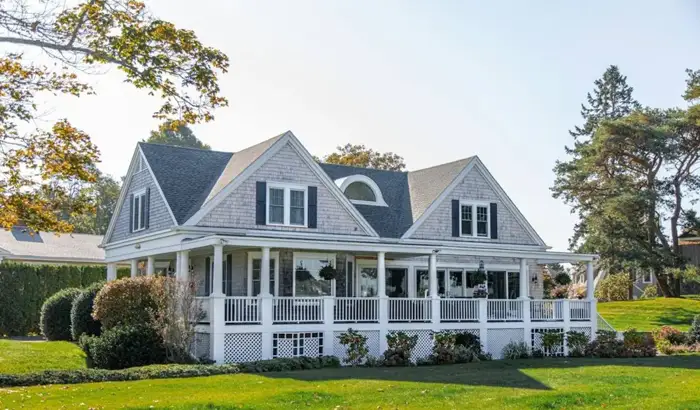
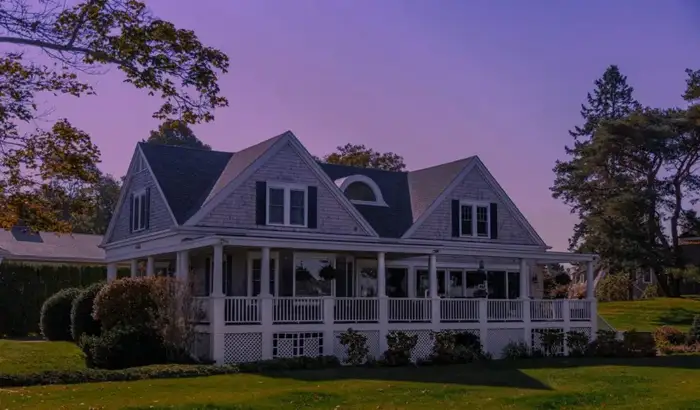
| Virtual twilight | Digital enhancement (Qld: indicate it) | Label it and keep the daytime shot in the gallery |
| Virtual staging | Qld: clearly indicate; NSW rentals: disclose if likely to mislead once s 22B commences | Furniture that fits the room; label it; include the empty room |
| Removing the vendor's clutter, bins or a parked car | Removing items is "removing features" on a strict reading of the NSW wording | Physically tidy before the shoot where you can; if you edit, label it |
| Removing powerlines, neighbouring buildings or damage; making a neglected pool look clean | Listed as practices to avoid by Qld (the pool is its case example); "hide undesirable features" (Vic) | Don't. We refuse these edits |
| "Sold", "Auction", logo or phone number on the image | Not allowed by REA or Domain | Leave it off; use a watermark only to each portal's spec |
A shoot list for Australian portal galleries
These are our suggestions as editors, built around the portal and regulator points above. They are not portal rules.
- Shoot 4:3 landscape at 2000 x 1500 or larger, and keep the important part of the hero shot inside the central three-quarters of the frame.
- Hero first. A strong, honest front exterior, then living areas, kitchen, bedrooms, bathrooms and outdoor spaces, which is the order REA suggests.
- Prepare the property, not the file. Clean the pool, mow the lawn, put the bins away and move cars before the photographer arrives. Domain's editors for its own Matterport shoots won't remove those things, and Queensland's guide warns against using AI to make a property look in better condition than it is.
- Views from the property, at true distance. If the water view is from the balcony, shoot it from the balcony with a standard focal length.
- Area shots last. Parks, beaches and cafés nearby go after the property photos, never as the main image or in the first three on Domain.
- No people or pets in frame. REA asks for this unless unavoidable. For tenanted homes in NSW, give tenants notice, let them move belongings, and get written consent for any shot where their things are still visible.
- Floorplan as its own file. If you supply it as a GIF, REA wants a static GIF on a white, non-transparent background.
- Reshoot after changes. New paint, a renovation or storm damage means new photos. Old photos are on both the NSW and Queensland lists.
Common photo mistakes on Australian portals (our view)
- "Auction this Saturday" burned into the hero shot. REA lists text overlays like this as not allowed; use the portal's own fields.
- A beach photo as image two. Domain bars area shots in the first three, and NSW wants nearby views clearly identified.
- A staged lounge with no empty-room photo and no note. Queensland recommends saying it's staged; NSW rentals will need a statement once the new rule starts.
- Powerlines edited out. Queensland's guide lists this as a practice to avoid, and buyers will see them at the open home anyway.
- 45 photos sent unsorted. REA keeps 35. Decide which ones.
- A big coloured logo in the corner. REA asks for a colourless, transparent watermark of no more than 2% of the image, bottom right.
- Last year's photos on a relisting. If the garden, paint or condition has changed, the old set no longer shows the property as it is.
A brief you can send your photographer or editor
- 4:3 landscape JPEGs, 2000 x 1500 or larger, RGB; web copies under 2.5MB if anyone uploads directly to Agent Admin.
- Hero: best honest front exterior, key detail central. Then rooms in inspection order, outdoor areas, then area shots last.
- No people, pets, family photos, documents or tenant belongings in frame unless the tenant has given written consent.
- Default edits: exposure, colour and white balance, contrast, window pull, verticals.
- Sky, twilight or staging only when asked, each delivered with the untouched original and a suggested description note.
- No text, logos, borders, collages or contact details on any image. Watermark only to each portal's spec.
- Never remove fixed features, powerlines, neighbouring buildings, damage or wear, and never swap or zoom a view.
Booking aerials as well? Our guide to drone listing photos and CASA rules covers drone weight, accreditation, the 30 m rule and airport checks.
What it costs to have us edit the set
As published on our pricing and listing photos pages: first listing US$29, then US$32 per listing, or US$229 a month for regular listings. The listing photos page can also show those prices in Australian dollars (A$39, A$41 and A$299). Edits are delivered within 24 hours, and you pay after delivery. You keep your originals, so the untouched frame can stay in the gallery beside each enhanced one. If you'd like to judge the style first, send one listing photo to hello@lightandpolish.com or use the contact form and we'll edit it free. More on our Australian service is on the real estate photo editing in Australia page.
Related reading: photo editing for Australian and UK agencies, sky replacement, is virtual staging legal?, and our portal guides for the UK, Canada and Dubai.
Frequently asked questions
What size should realestate.com.au photos be?
REA Support's image requirements page recommends 2000 x 1500 pixels at a 4:3 ratio, and also accepts 3:4, 16:9, 3:1 and 16:10. Files can be JPEG, PNG or static GIF, RGB colour, up to 20MB each. Agents can upload up to 35 photos on a residential listing. If you upload directly in Agent Admin rather than through a CRM, REA's resizing article says to keep each file under 2.5MB.
Can I put our agency logo on realestate.com.au or Domain photos?
Only as a watermark that meets each portal's specification. REA's watermark guidelines say a watermark must be colourless, transparent, in the bottom right-hand corner and no larger than 2% of the total image size. Domain's breach-listings article says images may not include a logo, text or border, and shows its permitted watermark specification on the same page.
Is virtual staging or sky replacement allowed in Australia?
Neither portal's help pages ban them outright, but regulators say photos must not mislead. NSW Fair Trading says agents must not digitally add or remove features, and that adjusting lighting to compensate for poor lighting may be acceptable. Queensland's Office of Fair Trading recommends clearly indicating when images have been digitally enhanced or virtually staged. Label these edits and never use them to hide defects or change the property.
Do NSW agents have to disclose AI-edited rental photos?
A new section 22B(5) of the Residential Tenancies Act 2010, inserted by an Act assented to on 2 October 2026, will require a statement in rental ads that use digitally generated or altered images reasonably likely to mislead. It starts on a day to be appointed by proclamation, so check NSW Fair Trading for the start date. Sales ads are already covered by the general ban on misleading conduct.
Our services: Real estate photo editing (first listing US$29) · Real estate photo editing australia · Free listing photo checklist (PDF)
Related
- Real estate listing photo editing
- Quebec listing photos: OACIQ AI label, French text and sold banners (2026)
- How much does drone photo editing cost for real estate? (2026 prices)
- How much does 360° virtual tour editing cost? (2026 prices)
- Dubai holiday home listing photos: DET permit and platform rules (2026)
- How much does real estate video editing cost? (2026 prices)
- Drone listing photos in Australia: CASA rules for agents (2026)
This article is general information, not legal advice. Rules change; check the linked official sources.